
 Distribution PL · 4REF
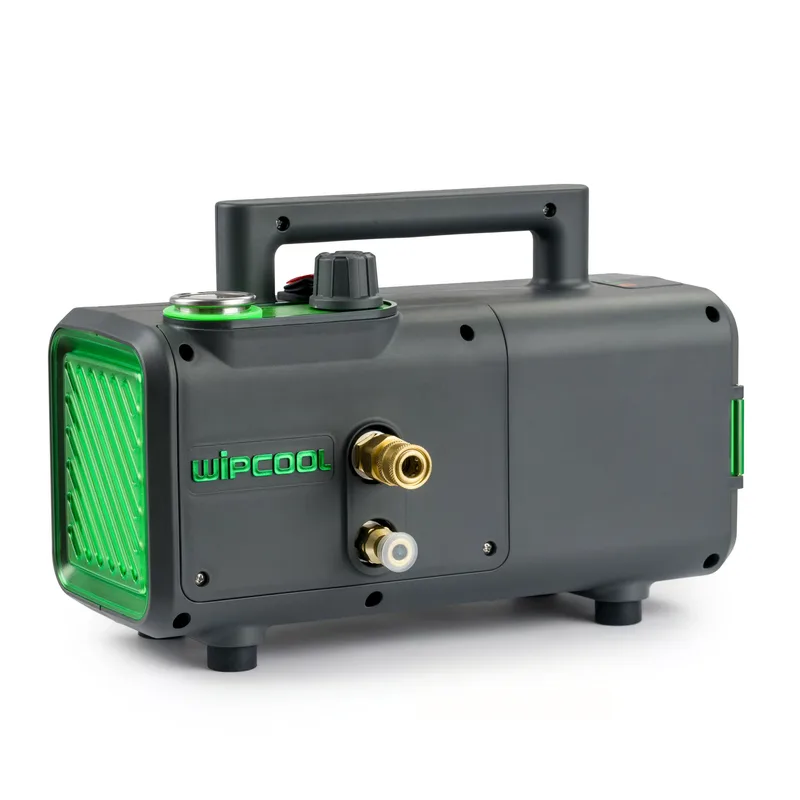
Wipcool C28T/C28B user manual
The Wipcool C28T and C28B pressure washers are used to clean air conditioner evaporators and condensers. The C28T is powered by a 230 V mains supply and has continuous pressure adjustment via a dial. The C28B runs on an 18 V battery and has two pressure levels.
The user manual is an integral part of the product. Please read this manual carefully and follow all instructions strictly.
General information
Wipcool products are designed for professional use by qualified air conditioning and refrigeration engineers. As the manufacturer, Wipcool stipulates that our equipment should only be operated by people with the appropriate qualifications and training.
- ■Comply with all local safety regulations and general safety standards when using the Wipcool C28T/C28B pressure washer.
- ■Keep the user manual near the device so that personnel can access it easily at all times.
- ■Before use, qualified personnel should read the user manual carefully and understand all the instructions it contains.
- ■The manufacturer accepts no liability for any damage resulting from improper use, failure to follow the user manual, lack of personnel qualifications or any unauthorised modifications to the device.
- ■The general terms of sale contained in the sales documents apply.
Symbols and conventions
Signs and symbols used on the device and in the manual:
- 01
 Warning - read the text in the box next to the symbol.
- 02
 Dangerous voltage - risk of electric shock.
- 03
 Flammable materials - risk of fire or explosion.
- 04
 Wear eye protection.
- 05
 Wear protective gloves.
- 06
 Notice - risk of damage to the device or incorrect results.
- 07
 Indicates that the product meets the health, safety and environmental standards applicable in the European Union.
- 08
 Do not dispose of the pressure washer with household waste.
Safety information
General rules
- ■Check the pressure washer, hoses and connections before each use. Do not use the device if it is damaged or operating incorrectly.
- ■Ventilate the work area. Keep bystanders and children away from the pressure washer while it is operating.
- ■Stay alert and maintain a stable stance. Do not overreach or stand on an unstable surface.
- ■Do not operate the device when tired or under the influence of alcohol, drugs or medication that affects your ability to work.
- ■Use approved accessories and spare parts, and the original spray gun and nozzles intended for this pressure washer.
- ■Do not remove the covers or dismantle the pressure washer yourself. Have it repaired by the service centre - submit a service request at wipcool.pl/serwis.
Technical specifications
| Parameter | C28T | C28B |
|---|---|---|
| Power supply | 230 V~ / 50 Hz | 18 V DC, AEG/RIDGID interface |
| Pressure adjustment | 5–28 bar, continuous | Two levels, selected using the switch |
| Maximum flow rate | 5 l/min | 4.5 l/min |
| Output power | Approximately 0.56 kW | Approximately 0.37 kW |
| Protection class | I | III |
| Operating temperature | 5–50 °C | 5–50 °C |
| Storage temperature | 5–40 °C | 5–40 °C |
| Device weight | 10 kg | 6 kg |
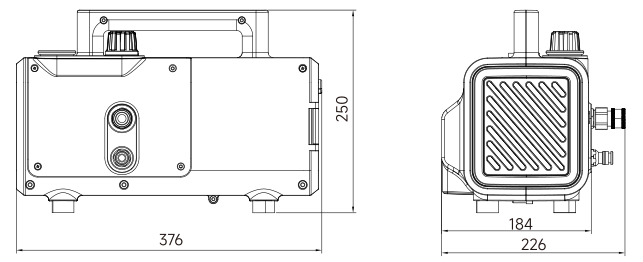
| Dimensions (L × W × H) | 376 × 226 × 250 mm | 376 × 226 × 250 mm |
| Inlet hose / high-pressure hose | 2 m / 7 m | 2 m / 7 m |
C28B: approximate runtime 30–45 min with an 18 V / 9.6 Ah battery. The C28B is sold without a battery.
Device diagram
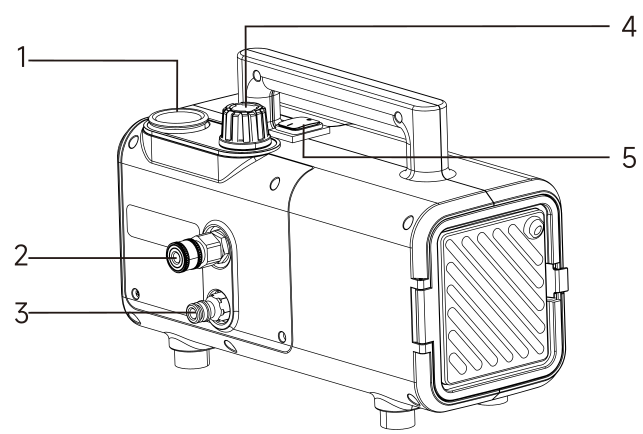
| No. | Name |
|---|---|
| 1 | Pressure gauge (C28T) |
| 2 | Water outlet |
| 3 | Water inlet |
| 4 | Pressure adjustment dial (C28T) |
| 5 | Switch |
On the C28T, read the current pressure on the pressure gauge.
Pressure washer dimensions
Package contents
- ■C28T or C28B pressure washer.
- ■Spray gun.
- ■2 m inlet hose with inlet filter.
- ■7 m high-pressure hose.
- ■0° pinpoint nozzle.
- ■Rotary nozzle.
- ■36 cm extension.
- ■Foam nozzle.
- ■1:3 dispenser.
- ■User manual.
After unpacking, check that the package is complete and in good condition. Report any missing items or transport damage to the seller.
Transport and storage
- ■Transport the pressure washer in its original packaging. Secure it against movement, shocks and excessive vibration; do not throw the packaging.
- ■Protect the pressure washer from moisture, dust and extreme temperatures during transport.
- ■Store the pressure washer horizontally in a dry, ventilated place, away from sunlight and heat sources, at a temperature of 5–40 °C.
- ■Do not place objects on the housing. During storage, do not pinch the cables or kink the high-pressure hose.
- ■Protect the pressure washer from frost. Water frozen in the pump can damage the pump head and motor. Have the service centre prepare it for winter storage - submit a service request at wipcool.pl/serwis.
Application
The pressure washers can be used to remove dust, deposits and dirt from the fins of domestic and commercial air conditioners and to wash drain pans, housings and unit covers.
Connection
- 01With the pressure washer switched off and disconnected from the power supply, check the condition of the hoses, connections and C28T power cable. Check the inlet filter, spray gun head and the fastening of screws and nuts.
- 02Check the oil level in the oil level sight glass - see the ‘MAINTENANCE’ section.
- 03Connect the high-pressure hose to the pressure washer water outlet, and connect its other end to the spray gun using the quick-release coupling. A click indicates that the quick-release coupling has locked; do not fit the nozzle yet.
- 04Connect the inlet hose to the pressure washer water inlet and check that the seal is present. When drawing water from a tank, immerse the end of the hose with the inlet filter in the water; the water surface must not be lower than the pressure washer.
- 05When supplying water from a tap, connect the free end of the inlet hose to the tap and turn on the water supply.
- 06Connect the C28T to an earthed 230 V socket or insert an 18 V AEG/RIDGID battery compatible with the device interface into the C28B. Only start the pressure washer when bleeding air from it.
Operating instructions
Bleeding air
- 01Press and hold the spray gun trigger without a nozzle fitted, then switch on the pressure washer at the lowest pressure: C28T - pressure adjustment dial at minimum, C28B - switch position I.
- 02When drawing water from a tank, once water begins to flow, continue operating with the trigger held down for 1 min. When supplied from a tap, hold the trigger down until water flows in a steady stream.
Cleaning
- 01Switch off the pressure washer and disconnect the power supply. If using a tap, turn off the water supply; press the spray gun trigger to release the pressure in the high-pressure hose. Fit the original nozzle and an extension suitable for the job.
- 02If using the 1:3 dispenser, fit it at the spray gun and place the suction tube in the product container.
- 03If using a tap, turn on the water supply. Connect the power supply and switch on the pressure washer. On the C28T, set the pressure using the pressure adjustment dial; on the C28B, select the level using the switch.
- 04Start at low pressure and test the spray on an inconspicuous area of the surface being cleaned. Adjust the pressure and distance so that the fins are not deformed; turn the rotary nozzle left or right to set a straight or fan spray.
Finishing work
- 01Switch off the pressure washer and disconnect the power supply.
- 02If using a tap, turn off the water supply. Press the spray gun trigger to release the pressure in the high-pressure hose.
- 03Clean the housing and inlet filter as described in the ‘MAINTENANCE’ section.
Water dripping from the drain opening in the pump body during operation is normal and does not affect the operation of the pressure washer.
Maintenance
General recommendations
- ■After use, clean the exterior with a soft brush or cloth. Do not use water, alcohol, petrol, solvents, corrosive substances, strong detergents or polishes. Do not allow chemicals to enter the pressure washer.
- ■Remove dirt, particularly from the ventilation openings.
- ■To clean the inlet filter, remove it from the inlet hose, remove any dirt and refit it before operation. Do not use the pressure washer without the inlet filter. Dirt can block the pump, reduce pressure or stop the water flow.
- ■After maintenance, check the condition of the device and accessories, then connect the pressure washer and check its operation as described in the ‘CONNECTION’ and ‘OPERATING INSTRUCTIONS’ sections.
Oil
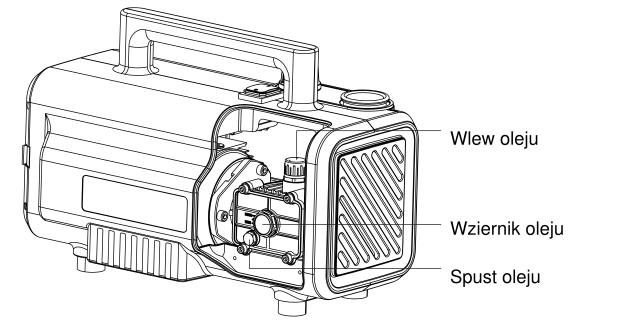
The correct oil level reaches the centre of the oil level sight glass. Use 15W-40 engine oil of API CD grade.
Have the service centre change the oil every 200 h of operation, including the first oil change after purchasing the pressure washer - submit a service request at wipcool.pl/serwis.
Seals
If water leaks from the pump head after prolonged use, stop using the device. Have it repaired by the service centre - submit a service request at wipcool.pl/serwis.
Troubleshooting
Before checking connections or removing the extension and nozzle, carry out the steps described in ‘Finishing work’.
| Problem | Possible cause | Solution |
|---|---|---|
| Pressure washer does not start | No mains power (C28T) | Check the power connection. |
| Pressure washer does not start | No battery power (C28B) | Check the battery connection and its compatibility with the device interface. |
| Pressure washer does not start | Incorrect mains voltage (C28T) | Check that the voltage is within ±5% of the rated voltage. |
| Pressure washer does not start | Temperature too low | Move the pressure washer to a warmer place within the operating temperature range of 5–50 °C. |
| Insufficient pressure | Air in the inlet hose | Remove the extension and nozzle. After connecting the water and power supplies, hold down the spray gun trigger and run the pressure washer for a few seconds to remove the air. |
| Insufficient pressure | Blocked water inlet | Clean the inlet filter. |
| Insufficient pressure | Dirt inside the pressure washer or hoses | Disconnect the hoses from the pressure washer and remove any accessible dirt from the hoses. If the blockage is inside the pressure washer or cannot be removed without dismantling the device, do not remove the covers. Have it repaired by the service centre - submit a service request at wipcool.pl/serwis. |
| Water leaks | Leaking connection | Check the connection and tighten the coupling. |
| Water leaks | Damaged seal (O-ring) | Check the seals accessible after disconnecting the couplings and replace any damaged ones. If replacement requires removing a cover or dismantling the pump head, do not carry it out yourself. Have it repaired by the service centre - submit a service request at wipcool.pl/serwis. |
| Noisy operation | Air being drawn in | Check the water level and inlet hose. |
| Noisy operation | Damaged internal components | Have it repaired by the service centre - submit a service request at wipcool.pl/serwis. |
| Motor hums and does not start after a long period of inactivity | Pressure washer unused for a long period | Switch off the pressure washer immediately. You may repeat the start attempt 2–3 times, stopping the motor immediately each time if it only hums. If it still does not start, stop attempting to start it. Have it repaired by the service centre - submit a service request at wipcool.pl/serwis. Do not remove the fan cover yourself. |
Waste electrical and electronic equipment
- 01The crossed-out bin symbol means that the used device must not be disposed of with other waste.
Under applicable regulations on waste electrical and electronic equipment, products marked with the separate collection symbol must not be disposed of with other municipal waste. Because they contain harmful substances, electronic products that are not separately sorted may be hazardous to the environment and human health. Proper separate collection of waste electrical and electronic equipment prevents adverse effects on the environment.
By taking used equipment to a collection point, the user contributes to its reuse, recycling and recovery.
Recycling - one method of protecting the environment. The process of recovering substances from waste that can be reused as raw materials.
Waste recovery - the use of waste that has lost its useful value, such as plastics, paper and cardboard, as secondary raw materials (also commonly understood to mean its destruction).
Information on the collection system for waste electrical and electronic equipment
- ■Waste electrical and electronic equipment must not be disposed of with other waste.
- ■The collection of incomplete electrical and electronic equipment and parts from waste equipment is prohibited.
- ■A distributor delivering equipment intended for households to a purchaser is required to collect household waste equipment free of charge at the place of delivery, provided that the waste equipment is of the same type and performs the same function as the equipment delivered.
- ■The user may hand over waste equipment to a waste equipment collector, a treatment facility or a municipal waste collector operating in the municipality.
- ■Information about collection points is available on the public information bulletin (BIP) websites of regional, city and municipal authorities.
Service and documents
Before submitting a service request, prepare:
- ■Model - shown on the device nameplate and on the invoice.
- ■Serial number - if there is none, provide the production number (e.g. 11/2025), usually found on the underside of the device.
- ■Proof of purchase - an invoice or receipt from an authorised distributor.
- ■Description of the fault - what is happening, since when and under what conditions.
You can submit a service request at wipcool.pl/serwis. You will also find the warranty terms there.