
 Distribution PL · 4REF
Wipcool P120S user manual
Read the entire manual before first use. Keep it for as long as you use the device.
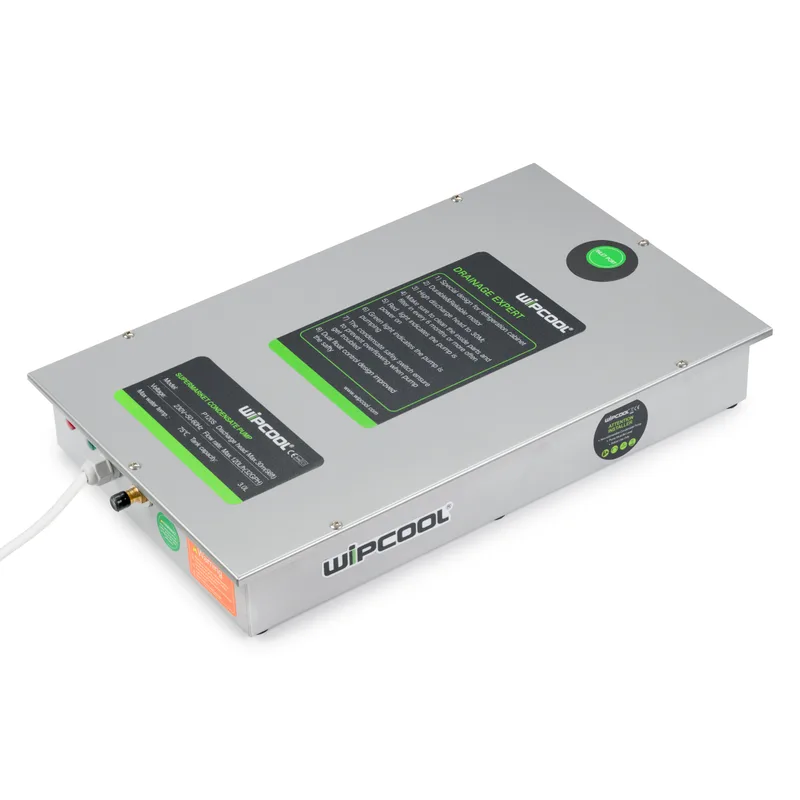
Wipcool P120S user manual
The Wipcool P120S Condensate Pump removes condensate from refrigerated display cabinets in supermarkets and food shops. It also pumps away water produced during defrosting.
The user manual is an integral part of the product. Please read this manual carefully and follow all instructions strictly.
General information
Wipcool products are designed for professional use by qualified air conditioning and refrigeration engineers. As the manufacturer, Wipcool stipulates that our equipment should only be operated by suitably qualified and trained personnel.
- ■Observe all local safety regulations and general safety standards when using the Wipcool P120S Condensate Pump.
- ■The user manual should be kept near the device so that personnel can access it easily at any time.
- ■Before use, qualified personnel should read the user manual carefully and understand all the instructions it contains.
- ■The manufacturer accepts no liability for any damage resulting from improper use, failure to follow the user manual, lack of qualified personnel or any unauthorised modifications to the device.
- ■The general terms of sale contained in the sales documents apply.
Symbols and conventions
Signs and markings used on the device and in the manual:
- 01
 Warning - read the text in the box next to the symbol.
- 02
 Dangerous voltage - risk of electric shock.
- 03
 Hot surface - allow it to cool before touching.
- 04
 Notice - risk of damage to the device or an incorrect operating result.
- 05
 Before starting work, read all safety and installation instructions carefully.
- 06
 Indicates that the product meets the health, safety and environmental standards applicable in the European Union.
- 07RoHSThe product meets the requirements for restricting the use of hazardous substances.
- 08
 Do not dispose of the device with household waste.
Safety information
Use the pump indoors only.
Installation, electrical connection and maintenance may only be carried out by qualified personnel.
- ■Do not install the pump if you notice any damage. Replace a damaged power cable with a replacement cable supplied by the manufacturer or its service department.
- ■The pump is intended for water only. Do not run it dry.
- ■Do not use the pump in oily or heavily dusty areas.
- ■During installation, coil any excess power cable and protect it from damage.
- ■Secure the inlet and discharge hose connections with hose clamps. Avoid joining hose sections with connectors.
- ■Do not place electrical devices or valuable objects beneath the pump. They may be flooded in the event of a leak or power failure.
Technical specifications
Device diagram
The pump has a stainless steel tank, a filter and a float switch. A non-return valve limits water backflow. Either the top or side inlet to the tank can be used.
The float switch starts the pump when the water level in the tank rises and stops it once the water has been pumped out.
Package contents
After unpacking, check that all items are present and in good condition. Report any missing or damaged items to the seller.
- ■P120S condensate pump with power cable.
- ■Hose clamp.
- ■User manual.
Transport and storage
Transport
- ■Before transport, disconnect the power supply and remove the water from the tank.
- ■Transport the pump in its original packaging, secured against movement. Do not throw it and protect it from shocks and excessive vibration.
- ■Protect the pump from dust and extreme temperatures.
Storage
- ■Store the pump horizontally in a dry, well-ventilated place, away from direct sunlight and sources of heat.
- ■Storage temperature: 5–50 °C.
- ■Before restarting, check that the hoses are clear and the float switch moves freely, then carry out an operating test.
Installation
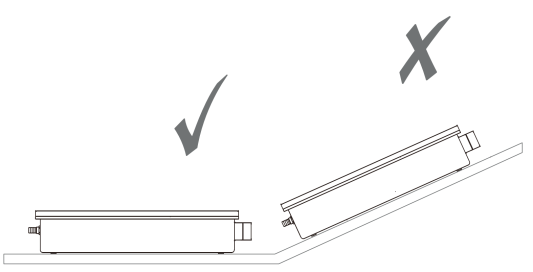
- 01With the power disconnected, select a location beneath the drain of the refrigerated display cabinet's condensate tray. Secure the pump firmly and level the tank.
- 02Use a tool to make a hole in the selected inlet.
- 03Insert the inlet hose into the selected tank inlet. Route it without kinks or sections where water can collect.
- 04Connect a discharge hose of a suitable diameter to the discharge outlet. Select a hose length suitable for the discharge route and secure it with a hose clamp.
Connection
The power cable (POWER) has three conductors: L, N and PE. PE denotes the protective earth conductor. The signal cable has two conductors: COM and NC.
| Designation | Function | Conductor colour |
|---|---|---|
| L | Live conductor | Brown |
| N | Neutral conductor | Blue |
| NC | Normally closed contact | Black |
| COM | Common contact | Black |
Alarm circuit
Connect COM and NC to a compatible safety input on the refrigerated display cabinet controller. Use the terminal designations in the controller documentation. Check the controller documentation for the required input state and the refrigerated display cabinet's response to an alarm. Do not permanently bridge the alarm.
If the controller does not have a compatible input, use a suitably rated contactor or another alarm device. If using a contactor, connect COM and NC in the contactor control circuit, and its power contacts in the refrigerated display cabinet power supply circuit.
Operation
Test after installation
- 01Check that the tank is level and check the water connections and electrical connection.
- 02Switch on the pump's power supply and start the refrigerated display cabinet. Feed water into the tank while watching its level. Do not allow the tank to overflow or the pump to run dry.
- 03Observe the pump starting, pumping out the water and stopping automatically when the level drops. Check for leaks and verify drainage.
- 04Repeat the test. If a leak occurs or the water does not drain, stop the test, correct the cause and repeat the test before starting the refrigerated display cabinet.
Operation and shutdown
Water may continue to drain into the tank after the refrigerated display cabinet has stopped or after defrosting. Leave the pump powered on after an alarm as well, so that it can pump out this water.
If the pump does not operate correctly, stop the refrigerated display cabinet.
Maintenance
General recommendations
Clean the filter, float switch and tank every six months, or more often if operating conditions require it. Spring and autumn are the recommended times.
- ■Clean external surfaces with a mild cleaning agent, such as a small amount of soap.
- ■Do not use alcohol, petrol, solvents, corrosive substances or strong detergents.
- ■When cleaning the refrigerated display cabinet, disconnect the pump from the power supply and protect it from incoming chemicals. Thoroughly flush these chemicals from the system before restoring power to the pump and resuming the flow.
Disassembly
- 01Prepare a container for the remaining water, then disconnect the inlet and discharge hoses. If the discharge outlet is blocked, remove it by hand, clear the debris and refit it.
- 02Undo the cover screws on the inlet side, remove the cover, then remove the filter and float switch.
Cleaning
- ■3. Remove deposits and blockages. Wash the filter, float switch and tank with an antibacterial agent compatible with the pump materials, then rinse the tank with clean water.
Reassembly and operating test
- ■4. Fit the float switch and check that it moves freely before fitting the filter and closing the cover. Fit the remaining components and connect the inlet and discharge hoses.
- ■5. After reassembly, connect the power supply and carry out the operating test described in the ‘OPERATION’ section.
Troubleshooting
| Problem | Possible cause | Solution |
|---|---|---|
| Pump does not operate | No power supply | Check that the device is connected to the power supply. |
| Pump does not operate | Incorrect cable connections | Check that the power cable (POWER) is connected correctly. |
| Pump does not operate | Incorrect voltage | Check that the voltage matches the rating plate. |
| Pump does not operate | Tank is not level | Level the tank and check the water level. |
| Pump runs continuously | Tank is not level | Level the tank. |
| Pump runs continuously | Deposits in the tank or on the float switch | Clean the tank and float switch. |
| Pump runs but does not discharge water | Blocked inlet or outlet | Check and clear the inlet and outlet. |
| Pump runs but does not discharge water | Tank is not level | Level the tank. |
| Water leaks | Damaged discharge hose | Check the hose and replace it if damaged. |
| Water leaks | Incorrect hose connection | Check that the hose is connected and secured correctly. |
| Pump gurgles or makes noise after switching off | The end of the discharge hose is lower than the pump, creating a siphoning effect | Route the hose so that its end is higher than the pump. |
| Noisy pump operation | Damage to internal components | Stop using the pump. Arrange a repair with the service department - submit a service request at wipcool.pl/serwis. |
| Pump switches on and off too frequently | Condensate inflow is too high | Check that the condensate inflow does not exceed the pump's maximum flow rate (120 l/h). |
| Pump switches on and off too frequently | Deposits in the tank | Clean the tank. |
| Pump switches on and off too frequently | Tank is not level | Level the tank. |
| Alarm activates | Condensate level is too high | Check that the outlet is clear and condensate is draining. |
| Alarm activates | Alarm connection problem | Check the signal cable connections. |
If the problem persists, stop using the pump. Arrange a repair with the service department - submit a service request at wipcool.pl/serwis.
Waste electrical and electronic equipment
- 01The crossed-out bin symbol means that the device must not be disposed of with other waste at the end of its life.
Under applicable regulations on waste electrical and electronic equipment, products marked with the separate collection symbol must not be placed with other municipal waste. Because they contain harmful substances, electronic products that are not sorted separately may be hazardous to the environment and human health. Proper separate collection of waste electrical and electronic equipment prevents adverse effects on the environment.
By taking waste equipment to a collection point, the user contributes to its reuse, recycling and recovery.
Recycling - one method of protecting the environment. The process of recovering substances from waste that can be reused as raw materials.
Waste recovery - the use of waste that has lost its usefulness, such as plastics, paper and cardboard, as secondary raw materials; the term is also commonly used to mean destruction of waste.
Information on the collection system for waste electrical and electronic equipment
- ■Waste electrical and electronic equipment must not be placed with other waste.
- ■Collection of incomplete electrical and electronic equipment and parts from waste equipment is prohibited.
- ■A distributor delivering equipment intended for households to a purchaser is required to collect waste household equipment free of charge at the place of delivery, provided that the waste equipment is of the same type and performs the same function as the equipment delivered.
- ■The user may hand over waste equipment to a waste equipment collector, a treatment facility or a municipal waste collector in the municipality.
- ■Information about collection points is available on the Public Information Bulletin (BIP) websites of regional, city and municipal offices.
Service and documents
Before submitting a service request, prepare:
- ■Model - shown on the device's rating plate and on the invoice.
- ■Serial number - if there is none, provide the production number (e.g. 11/2025), usually found on the underside of the device.
- ■Proof of purchase - an invoice or receipt from an authorised distributor.
- ■Description of the fault - what is happening, when it started and under what conditions.
You can submit a service request at wipcool.pl/serwis. You will also find the warranty terms there.