
 Distribution PL · 4REF
Wipcool R6 PRO user manual
Read the entire manual before first use. Keep it for as long as you use the device.
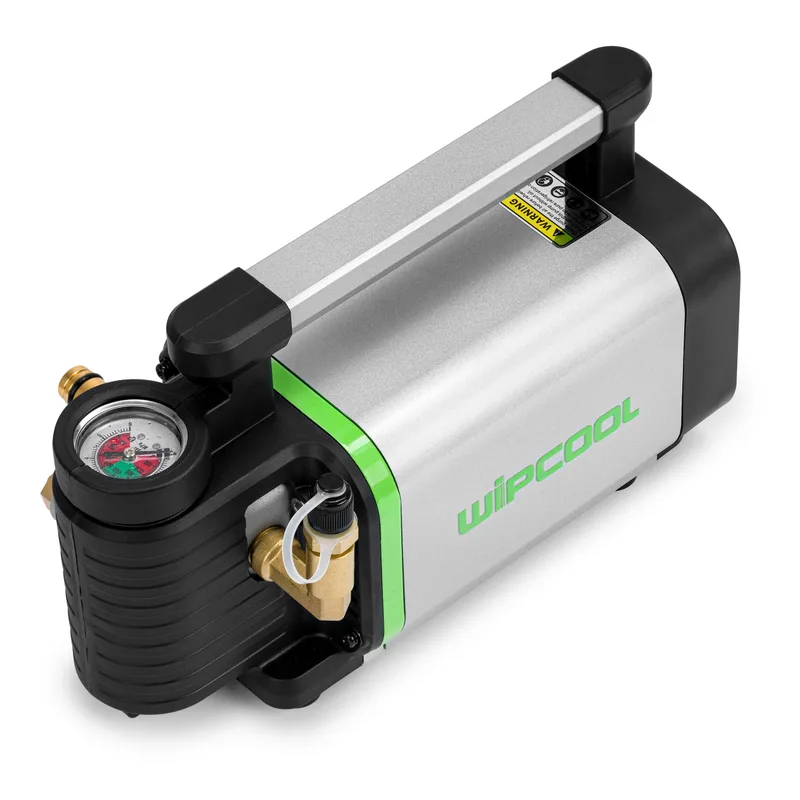
Wipcool R6 PRO user manual
The Wipcool R6 PRO Electric Oil Charging Pump is used to top up and replace refrigeration oil in compressors. It has an integrated gear pump.
The user manual is an integral part of the product. Please read this manual carefully and follow all instructions closely.
General information
Wipcool products are designed for professional use by qualified air conditioning and refrigeration engineers. As the manufacturer, Wipcool specifies that our equipment should be operated only by suitably qualified and trained personnel.
- ■Observe all local safety regulations and general safety standards when using the Wipcool R6 PRO Electric Oil Charging Pump.
- ■The user manual should be kept near the device so that personnel can access it easily at any time.
- ■Before use, qualified personnel should read the user manual carefully and understand all the instructions it contains.
- ■The manufacturer accepts no liability for any damage resulting from improper use, failure to follow the user manual, lack of personnel qualifications or any unauthorised modifications to the device.
- ■The general terms of sale contained in the sales documents apply.
Symbols and conventions
Signs and markings used on the device and in the manual:
- 01
 Warning - read the text in the box next to the symbol.
- 02
 Hazardous voltage - risk of electric shock.
- 03
 Hot surface - wait for it to cool before touching.
- 04
 Flammable material - fire hazard.
- 05
 Before starting work, read all safety and installation instructions carefully.
- 06
 Indicates that the product meets the health, safety and environmental standards applicable in the European Union.
- 07
 Do not dispose of the pump with household waste.
Safety information
Technical specifications
Device diagram
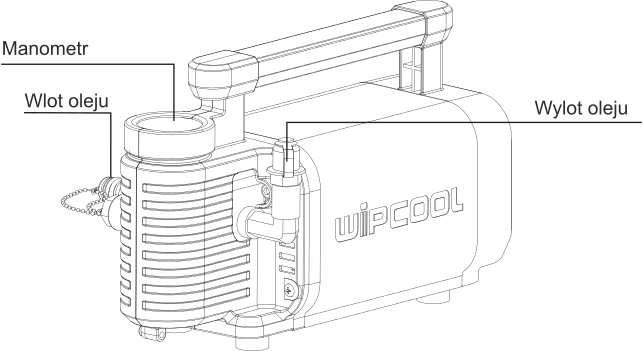
Components shown in Figure 1
| Component | Function |
|---|---|
| Pressure gauge | Indicates the oil discharge pressure. |
| Oil inlet | Suction hose connection. |
| Oil outlet | Discharge hose connection. |
Other pump components
| Component | Function |
|---|---|
| Power switch | Switches the pump on and off. |
| Bypass valve | Directs oil through a return line to the oil inlet, reducing pressure at the oil outlet. |
| Thermal protection | Protects the motor from overheating. |
| Filter | Traps contaminants in the oil. |
| Motor fan | Cools the motor. |
Contents
- ■R6 PRO pump.
- ■0.8 m suction hose.
- ■1.5 m discharge hose.
- ■1/4" and 3/8" SAE adapters.
- ■Tool case.
After unpacking, check that the set is complete and in good condition. Report any missing or damaged items to the seller.
Transport and storage
Before storage, remove any remaining oil from the hoses and pump, then pack them in a sealed plastic bag.
Connection
- 01Check that the type of oil in the container matches the type required for the compressor.
- 02Check the supply voltage and frequency against the pump's rating plate.
- 03Clean the suction and discharge hoses to prevent oils from mixing. Connect the suction hose to the oil inlet and the discharge hose to the pump's oil outlet.
- 04Immerse the end of the suction hose in the oil container.
- 05With the pump switched off, connect the power supply.
Instructions for use
Bleeding the pump
- 01Place the free end of the discharge hose in a clean container to collect the oil.
- 02Switch on the pump using the power switch to draw in oil and remove air from the suction hose and pump housing.
- 03When the oil flowing out stops foaming and there is no distinct sound of escaping air, switch off the pump.
Pumping oil into the compressor
- 01After bleeding the pump and filling the discharge hose with oil, connect the hose to the closed compressor service valve.
- 02Switch on the pump, then open the service valve.
- 03After pumping in the oil, close the service valve, then switch off the pump.
- 04Disconnect the discharge hose from the service valve.
Maintenance
Use clean refrigeration oil. Check the condition of oil before using it again after a long period of storage.
Troubleshooting
| Problem | Possible cause | Solution |
|---|---|---|
| Pump does not start | No power supply | Check the power supply and power switch. |
| Pump does not start | Incorrect voltage | Check that the supply voltage is within ±5% of the rated voltage on the pump's rating plate. |
| Pump does not start | Ambient temperature too low | Move the pump to a warmer location. |
| Pump does not start | Pump blocked by contaminants | Arrange for repair by the service team - submit a request at wipcool.pl/serwis. |
| Flow rate is too low or the pump does not deliver oil | Blocked suction hose | Clean the suction hose. |
| Flow rate is too low or the pump does not deliver oil | Blocked filter | Arrange for repair by the service team - submit a request at wipcool.pl/serwis. |
| Flow rate is too low or the pump does not deliver oil | Air in the pump or suction hose | Bleed the pump as described in the ‘Instructions for use’ section. |
| Flow rate is too low or the pump does not deliver oil | Blocked discharge hose | Clear the discharge hose. |
| Flow rate is too low or the pump does not deliver oil | Oil level too low | Check that the end of the suction hose is below the oil surface. |
| Flow rate is too low or the pump does not deliver oil | Pump has been stored for a long time | Pour a small amount of oil into the pump through its oil inlet. |
| Pump is noisy | Oil level too low | Check that the end of the suction hose is below the oil surface. |
| Pump is noisy | Contaminants inside the pump | Arrange for repair by the service team - submit a request at wipcool.pl/serwis. |
| Pump is noisy | Air in the pump or suction hose | Bleed the pump as described in the ‘Instructions for use’ section. |
| Pump is noisy | Pump housing damaged | Arrange for repair by the service team - submit a request at wipcool.pl/serwis. |
| Pump temperature is too high | Operating pressure exceeds the pump's maximum pressure | Check the system requirements and select a pump for the required pressure. |
| Pump temperature is too high | Insufficient fan cooling | Check that the motor fan is running. |
| Pump temperature is too high | Ambient temperature too high | Move the pump to a cooler location. |
| Pump temperature is too high | Poor ventilation | Place the pump in a location with better airflow. |
Waste electrical and electronic equipment
- 01The crossed-out bin symbol means that the end-of-life device must not be disposed of with other waste.
Under applicable regulations on waste electrical and electronic equipment, products marked with the separate collection symbol must not be disposed of with other municipal waste. Because they contain harmful substances, electronic products that are not sorted separately may be hazardous to the environment and human health. Proper separate collection of waste electrical and electronic equipment prevents adverse effects on the environment.
By handing over waste equipment to a collection point, the user contributes to its reuse, recycling and recovery.
Recycling - a method of protecting the environment. The process of recovering substances from waste that can be reused as raw materials.
Waste recovery - the use of waste that has lost its useful value, such as plastics, paper and cardboard, as secondary raw materials; colloquially, the term can also mean its destruction.
Information on the collection system for waste electrical and electronic equipment
- ■Waste electrical and electronic equipment must not be disposed of with other waste.
- ■The collection of incomplete electrical and electronic equipment and parts from waste equipment is prohibited.
- ■A distributor delivering equipment intended for households to a purchaser must collect waste equipment from households free of charge at the place of delivery, provided that the waste equipment is of the same type and performs the same function as the equipment delivered.
- ■The user may hand over waste equipment to a waste equipment collector, a treatment facility or a municipal waste collector in the municipality.
- ■Information on collection points is available on the BIP websites of regional, city and municipal offices.
Service and documents
Before submitting a service request, prepare:
- ■Model - found on the device's rating plate and on the invoice.
- ■Serial number - if there is none, provide the production number (e.g. 11/2025), usually found on the underside of the device.
- ■Proof of purchase - an invoice or receipt from an authorised distributor.
- ■Description of the fault - what is happening, when it started and under what conditions.
You can submit a service request at wipcool.pl/serwis. You will also find the warranty terms there.