
 Distribution PL · 4REF
Pressure Washer with Steam Function
Read the entire manual before first use. Keep it for as long as you use the device.
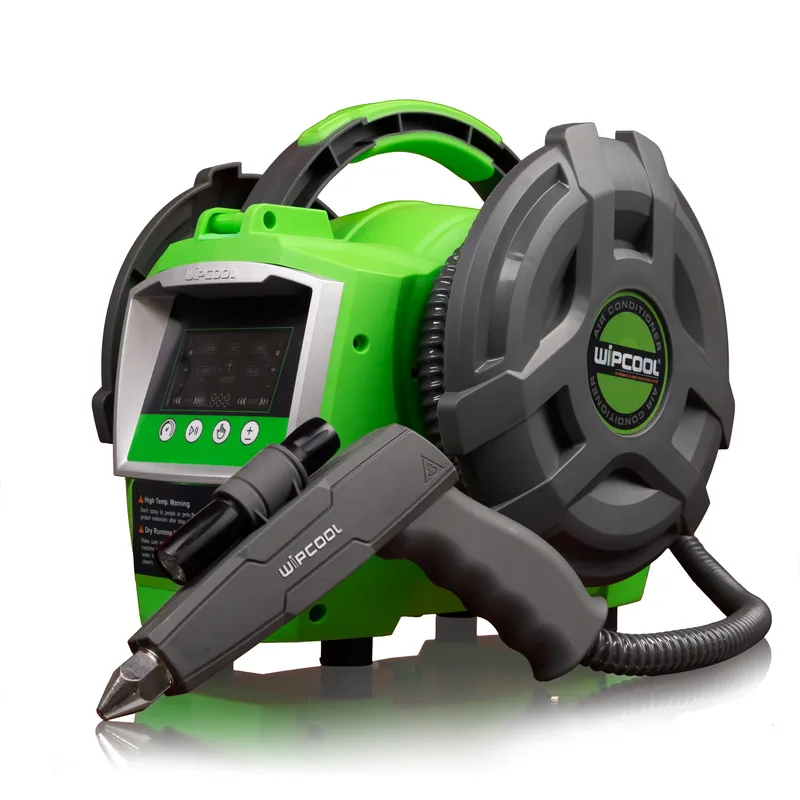
Everything under control
The numbers in the drawing correspond to the parts described below.
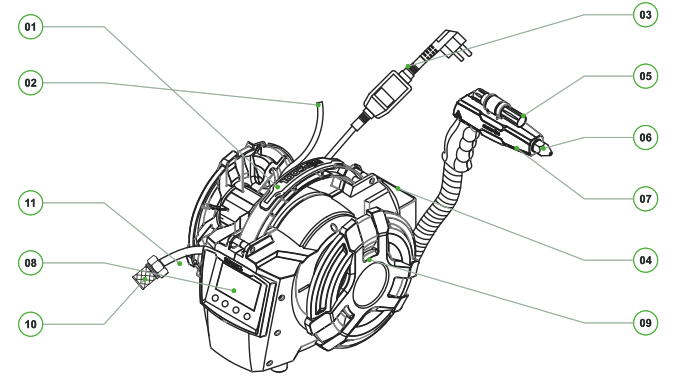
- 01Carrying handle
- 02Disinfection hose
- 03Power cable
- 04Gun holder
- 05Torch
- 06Universal nozzle
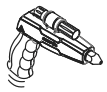
- 07Spray gun
- 08LCD display
- 09Drum housing
- 10Inlet filter
- 11Suction hose
Accessories
- 12
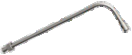 90° nozzle (35 cm)
 - 13
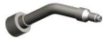 Steam nozzle
 - 14
 Nylon brush
 - 15
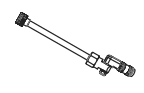 290° rotating nozzle
Also included: 18.5 cm extension, inlet filter and user manual. The universal nozzle is fitted to the gun.
Get to know the panel. Start work.
Device buttons and preparation for cleaning with water or steam.
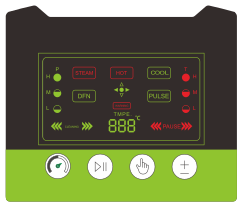
- 01
 Pressure / steam adjustmentChanges the pressure level or steam intensity.
 - 02
 START / STOPStarts and stops operation.
 - 03
 Mode selectionCOOL, HOT, STEAM, DISINFECT or PULSE.
 - 04
 Temperature / moistureTemperature in HOT, steam moisture in STEAM.
Preparation for work - 6 simple steps


Before you start work
This manual is part of the product. Keep it near the device.
Intended use and liability
The C30S is designed for professional cleaning of domestic air conditioners and small refrigeration units. The pump with a permanent magnet motor, LCD screen and multifunction gun allow operation with water, steam, in pulse mode and ozone disinfection. Cold water, hot water and steam share a common hose; the drum housing makes hose storage easier. High-pressure, high-temperature steam disinfects physically, without chemicals.
- 01The device must be operated only by adults who are suitably trained and qualified in HVAC/R servicing. Operation and maintenance require appropriate skills and tools.
- 02Comply with local safety rules and electrical installation regulations. Before use, read all instructions on installation, transport, repair and maintenance.
- 03The manufacturer accepts no liability for damage resulting from improper use, failure to follow the instructions, lack of qualifications or unauthorised modifications. The terms of sale stated in the sales documents apply.
- 04On delivery, check the condition of the device, the completeness of the equipment and any transport damage. Report problems to the seller or distributor. The manufacturer reserves the right to change the product and specifications without separate notice.
Key safety rules
Before cleaning, disconnect the air conditioner from the power supply. Cover its electronics. Before connecting accessories, maintenance or servicing, disconnect the pressure washer from the power supply. Do not use a damaged device. Use original accessories. Do not work in potentially explosive atmospheres or near flammable materials. Connect the pressure washer to an earthed socket. Do not modify the plug. Do not use adapters.
Meaning of symbols: warning - risk of injury; electrical hazard - risk of electric shock; read the manual - familiarise yourself with the operating rules; crossed-out bin - WEEE collection; CE - declared conformity with EU requirements; RoHS - restriction of hazardous substances.
14 rules for working with the C30S
Before use, check the power supply, water supply and condition of the accessories.
- 01Immerse the suction hose in clean water. Start in COOL to fill the system and prevent dry running. STEAM requires clean water.
- 02The maximum power is 3300 W. The electrical installation must be rated for it. If the protective device trips, stop working at this setting. Check the power supply. The lower heating level is 2200 W.
- 03Do not use strongly acidic or corrosive detergents. The manufacturer accepts no liability for damage and blockages caused by improper use. Descale as described in the ‘Maintenance and descaling’ section.
- 04Do not immerse the gun in water - this can damage its internal components.
- 05Use the short and long nozzles with a 2 mm orifice in STEAM only. Use the rotating nozzle in COOL or HOT, never in STEAM. Select the nozzle to suit the task.
- 06After working with hot water or steam, do not touch the heater or nozzle. Wait for them to cool down.
- 07If the steam is weak, check the nozzle for blockage and deposits. Descale as described in the ‘Maintenance and descaling’ section.
- 08Adjust the direction of the rotating nozzle by turning it left or right. Change the nozzle setting to select a focused jet or mist.
- 09After STEAM is switched on, steam generation takes about 25–30 seconds. Water remaining in the hose flowing out before then is normal.
- 10Before switching off, change to COOL to drain the water and cool the system. Do not drain the device in HOT or STEAM.
- 11HIGH TEMP indicates overheating. Check that the hose is immersed and the filter is not blocked. Eliminate the cause. After about 20 minutes of cooling, the pressure washer will resume operation.
- 12If the system does not self-prime, fill the hose and pump with water until water flows out of the outlet. The pressure washer will then return to normal operation. Do not start heating without water.
- 13If the device gets wet, stop work immediately. Disconnect the pressure washer from the mains. Wipe it and leave it to dry naturally before restarting.
- 14Do not point the jet at people, animals or the pressure washer itself. Keep away from electrical components; steam and hot water can cause burns.
Water and steam under control
Select the mode to suit the task, the nozzle type and the resistance of the surface being cleaned.
HOT - hot water
- 01Do not use corrosive agents; they can damage the system.
- 02Three pressure levels and three heating levels are available: 1100, 2200 and 3300 W.
- 03Set the pressure and temperature as required. Mains water is heated directly to 60°C, and in recirculation to 100°C.
- 04After each use, flush the hoses with clean water.
STEAM - steam
- 01Before heating, immerse the suction hose in clean water. Fill the system in COOL mode.
- 02Use clean water; do not use dirty water or detergent.
- 03The device must be operated by adults only.
- 04The supply water temperature must not exceed 50°C.
- 05Do not block the steam outlet; this can cause a pressure rise and damage.
- 06Water flowing from the gun during heating is normal.
- 07Clean the inlet filter before use.
- 08Water continues to flow for about 1 s. Beware of the high pressure and high water temperature.
- 09After use, drain the water in COOL. HOT or STEAM during draining can trigger HIGH TEMP.
- 10At HIGH TEMP, the device may automatically switch to COOL and resume STEAM after cooling down. Keep control of the gun.
The panel in detail
The numbers identify the elements described in the table below.
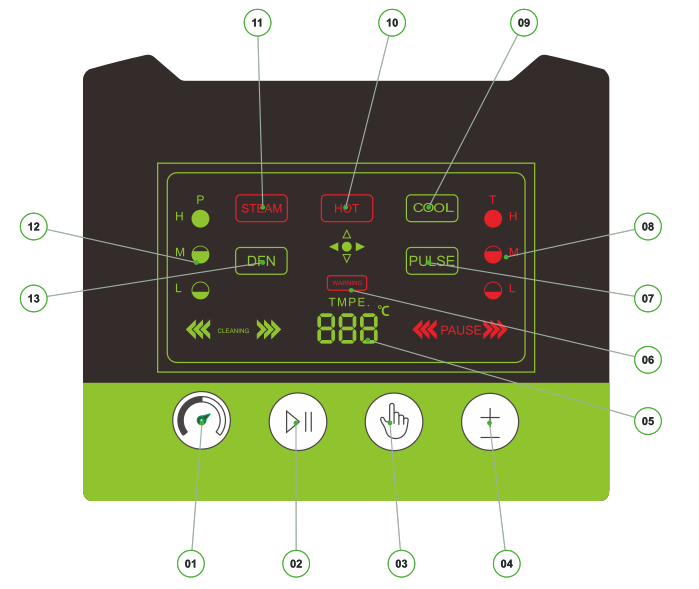
01–04: control buttons. 05–08 and 12: parameter readings and warnings. 09–11 and 13: mode indicators. PULSE 07 is an indicator; the mode is selected with button 03.
Adjust steam moisture with button 04 on the panel. To switch voice prompts, hold button 03 for 3 seconds in STOP.
Full panel legend and gun control functions.
| No. | Panel element | Function |
|---|---|---|
| 1 | Adjustment | COOL/HOT: pressure H/M/L. STEAM: low / high steam. |
| 2 | START/STOP | Starts or stops operation. |
| 3 | Mode selection | Changes the cleaning mode. |
| 4 | Temperature / moisture | HOT: temperature H/M/L. STEAM: steam moisture. |
| 5 | Temperature | Outlet water or steam temperature. |
| 6 | HIGH TEMP | Overheating warning; thermal protection. |
| 7 | PULSE | Pulse mode active indicator. |
| 8 | Temperature / steam level | Current setting indicator. |
| 9 | COOL | Cold water; three pressure levels. |
| 10 | HOT | Hot water; three pressure and heating levels. |
| 11 | STEAM | Two steam intensity levels. |
| 12 | Pressure / steam output | Shows H/M/L or low / high steam. |
| 13 | DISINFECT / DFN | Ozone treatment; DFN stands for DISINFECT. |
Gun controls
START/STOP starts and stops operation. FUNCTION in STOP selects COOL, HOT, STEAM, DISINFECT or PULSE. FUNCTION during COOL/HOT adjusts the pressure; during STEAM it changes the steam intensity. The torch makes work in dark places easier. Check that the gun controls work before you start.
From preparation to switch-off
Detailed sequence for safe operation.
- 01Disconnect the air conditioner from the power supply. Cover its electronics. Check the power cord and accessories. Clean the filter and nozzles. Prepare a way to collect the rinse water.
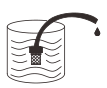
- 02Connect the inlet hose. Immerse its filter end in a container of clean water. Keep the filter below the water surface.
- 03Select the nozzle before you start. Use the 2 mm steam nozzles only in STEAM. Use the rotating nozzle in COOL/HOT, never in STEAM. Angled nozzles and extensions improve access. Set the spray direction and pattern as described for the nozzle.
- 04Check that the connections are dry and tight. With the pressure washer switched off, plug it into an earthed 230 V / 16 A socket. Switch on the pressure washer. Check the display. If the plug has TEST and RESET buttons, press RESET to switch on the power. Press TEST - the power should switch off. Press RESET again. If the power does not switch off after pressing TEST, do not use the pressure washer and contact the service centre.
- 05COOL test. Point the gun into the container. In STOP, select COOL. Press START/STOP. Watch the outflow until it is free and steady. Check for leaks. Press START/STOP. Check that the flow stops. Do not start heating without water. If there is no outflow, an unsteady jet, a leak or the flow does not stop, stop work. Switch off the pressure washer. Disconnect it from the mains. Correct the accessible connection. After correcting it, repeat the full COOL test. If the problem persists, contact the service centre.
- 06After a successful test, leave the pressure washer in STOP. Select the mode on the panel or gun. In COOL/HOT, select low, medium or high pressure. In HOT, also select the heating level. In STEAM, select low or high steam. Set the moisture on the panel. Read the settings and temperature on the LCD. Before starting, point the gun at the surface to be cleaned. Start with the START/STOP button.
- 07Move the gun steadily. Do not direct the jet at people, animals, the pressure washer or electrical components. Beware of hot water and steam. STEAM heat-up takes 25 to 30 s. Protect yourself from the hot outlet.
- 08After HOT/STEAM, press START/STOP. In STOP, select COOL. Ensure a water supply. Run COOL for about 10 s. Press START/STOP to stop the flow. Do not drain the unit in HOT or STEAM.
- 09Optionally, carry out disinfection. DISINFECT uses a separate black hose. Follow the description in the ‘Ozone disinfection’ section.
- 10If the pressure washer is running, press START/STOP. Switch it off. Disconnect it from the mains. Disconnect the inlet hose and accessories.
DISINFECT mode
Separate black ozone hose. Do not connect it to the water circuit.
DISINFECT mode uses an ozone generator to disinfect the cleaned unit after washing.
Safety during ozone treatment
Disinfection after cleaning
- 01Keep the cleaned air conditioner disconnected from the power supply.
- 02Place the black ozone hose inside the cleaned unit.
- 03Secure the unit. Seal it, e.g. with an AC cleaning cover.
- 04In STOP, select DISINFECT on the panel or gun.
- 05Press START/STOP. Leave the generator running for about 30 minutes.
- 06Press START/STOP to end the ozone treatment. Switch off the pressure washer. Disconnect it from the mains.
- 07Ventilate the room thoroughly after the ozone treatment.
Look after the unit after work
Handling the pressure washer safely helps keep it in good working order.
Application
The C30S is designed for cleaning air conditioning indoor and outdoor units and small refrigeration equipment. It can be used to clean evaporators, condensers, cooker hoods, refrigerators, washing machines, water heaters and water dispensers. Hot water and steam help remove grease, dust and deposits. Recirculation is used to remove scale and rust. The ozone generator provides disinfection and odour reduction. DISINFECT operation is described in the ‘Ozone disinfection’ section. Match the method to the resistance of the surface being cleaned. The ‘no disassembly’ claim does not permit flooding the electronics.
Transport
- 01Transport the pressure washer in its original packaging to reduce the risk of mechanical damage.
- 02Do not throw, knock or shake the unit or expose it to excessive vibration.
- 03Protect the unit from moisture, dust and extreme temperatures.
- 04For bulk transport, secure the packages. Stack them so that they cannot shift during transit.
Storage
- 01Choose a dry, well-ventilated place, away from direct sunlight and heat sources.
- 02Store at a temperature of 5 to 40°C.
- 03Store the unit on a stable surface. Secure it against tipping over and damage.
C30S specifications
230 V version.
| Parameter | General data |
|---|---|
| Power supply | 230 V~ / 50–60 Hz |
| Maximum power | 3,300 W |
| Working pressure | 3–6 bar |
| Maximum flow | 3 l/min |
| Max. suction lift | 1.5 m |
| Inlet / outlet hose | 1.5 m / 4 m |
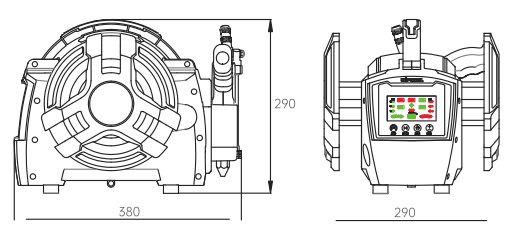
| Dimensions L x W x H | 380 x 290 x 290 mm |
| Electric shock protection | Class I |
| Weight | 5.5 kg |
Unit dimensions
Specifications by mode
STEAM: 130–150°C.
| Mode / parameter | Value |
|---|---|
| HOT - heating levels | 1,100 / 2,200 / 3,300 W; three levels |
| COOL / HOT - pressure | Three levels: low / medium / high |
| HOT - water temperature | up to 60°C |
| HOT - circuit temperature | 85–100°C |
| Inlet water | max. 50°C |
| STEAM - low / high steam | 2,200 / 3,300 W |
| STEAM - heat-up | Approx. 25–30 s |
| STEAM - continuous operation | Up to 3 hours |
| STEAM - outlet hose | 4 m |
| DISINFECT - power supply and power | 230 V~ / 50–60 Hz; 8 W |
| DISINFECT - ozone output | 300 mg/h |
| DISINFECT - hose | 2.5 m |
| DISINFECT - air purification | 51–150 m³/h |
Clean system. Reliable operation.
Carry out maintenance regularly, especially before and after the cooling season.
Maintenance and descaling
Before maintenance, carry out the full shutdown described in the ‘Step-by-step operation’ section. The pressure washer must be disconnected, depressurised and cooled down.
- 01Check the pressure washer, the cable and the accessories. Remove the filter only for cleaning. Check the filter mesh. Clean it. Inspect the gun head, nozzles and ventilation openings. Clear any blockages.
- 02Inspect the hoses and connectors. Replace worn parts. Refit the filter.
- 03Fit the remaining parts. Prepare a container of clean water. Immerse the filter in it. Only then connect the power supply. Carry out a full COOL test as described in the section ‘Step-by-step operation’. If it fails, follow the section ‘Step-by-step operation’.
Descaling the system
Calcium and magnesium deposits reduce performance and can cause HIGH TEMP. Descale after every 3–5 uses. Frequent alarms despite cleaning the filter require inspection by a service centre.
- 01Prepare the solution. Measure out 250 ml of Steam Descaler and 1.75 l of water. Remove only the tip. Immerse the filter. Direct the outlet without the tip into the same container.
- 02With the pressure washer switched off, connect the power supply. Switch on the pressure washer. Confirm STOP. Select COOL. Press START/STOP. Recirculate without heating. Once deposits stop coming out, no sooner than 15 min and no later than 25 min, stop the flow.
- 03Replace the solution with clean water. Select COOL. Press START/STOP. Rinse for 2 to 5 min without heating.
- 04After rinsing, stop the flow. Switch off the pressure washer. Disconnect it from the mains. Wait for it to cool down (section ‘Step-by-step operation’). The absence of visible particles does not confirm that product residue has been removed.
Find the cause of the problem
Before inspection, stop the pressure washer. Switch it off. Disconnect it from the mains. Leave internal repairs to a service centre.
| Symptom | Possible cause | Action |
|---|---|---|
| No power / no LCD | Loose plug, switch OFF | Check the plug. Check the switch position. |
| Unit does not work | Incorrect voltage | Check that the voltage and frequency match the rating plate. |
| Unit does not work | Damaged cable | Do not use; have the damaged cable replaced. |
| Operation interrupted | Circuit or socket overload | Stop operation at 3300 W. Check the circuit and power supply. Do not bypass protective devices. |
| HIGH TEMP / shutdown | Overheating or no water | Check that the hose is immersed. Check the filter. Allow the unit to cool down. Do not bypass the thermal protection. |
| Pump runs, no water | Empty container / hose above water | Check the water supply. Refill the container with clean water. Immerse the filter. Resume COOL as described in the section ‘Step-by-step operation’. |
| Pump runs, no water | Blocked inlet filter | Clean the filter. Refit it. |
| No suction / no water | Air or blockage in the pump | Fill the hose and pump with water until water flows from the outlet. The pressure washer will then return to normal operation. |
| Low pressure | Air in the hose | Ensure a water supply. Bleed in COOL mode into the container as described in the section ‘Step-by-step operation’. Do not disconnect hoses during operation. |
| Low pressure | Dirty filter, nozzle or hoses | After disconnecting, clean the filter, nozzle and accessible hoses. |
| Low pressure | Wrong nozzle or low setting | Select the correct nozzle. Increase the pressure setting. |
| No / weak / fluctuating steam | Low setting, start-up or dirty water | Check the mode and settings. Wait for the heat-up time. Use clean water. |
| No / weak / fluctuating steam | Blocked filter or nozzle | Check the filter and nozzle. Clean them. Do not obstruct the outlet. |
| No / weak / fluctuating steam | Scale or overheating | Remove the cause of overheating. Cool the unit down. Descale as described in the section ‘Maintenance and descaling’. If the symptom recurs, contact the service centre. |
| Noisy operation / unusual sound | Air, low water level, damaged hose | Check the water level, immersion and condition of the hoses. |
| Noisy operation / unusual sound | Contamination in the system | Clean accessible parts. Flush the hoses. |
| Noisy operation / unusual sound | Damaged internal components | Stop operation. Contact the service centre. |
| Leaks | Loose connections / damaged O-ring | After disconnecting, tighten the connection. Replace the seal. |
| Ozone function not working | DISINFECT inactive | Select DISINFECT. Start the function as described in the section ‘Ozone disinfection’. |
| Ozone function not working | Damaged ozone module | Contact the service centre. |
| Recurring HIGH TEMP | Deposits or another fault | Have the service centre inspect and descale the unit according to the section ‘Maintenance and descaling’. |
Take the equipment to the correct collection point
Waste electrical and electronic equipment must be collected separately.
- ZSEE
 Do not dispose of with household wasteThe crossed-out wheelie bin symbol indicates separate collection of waste electrical and electronic equipment. Do not dispose of the unit with household or other waste. This also applies to the electrical equipment of the pressure washer and gun.
Why is this important?
Improper handling of substances and components of the unit can harm health and the environment.
Where to take waste equipment?
- 01When buying new equipment, the seller takes back household waste equipment of the same type and function free of charge. For deliveries, collection takes place at the delivery address.
- 02At an authorised collection point. Hand the unit over to an authorised collector of waste equipment. Information on collection points is available from the seller or the local authority. Hand over equipment from business use to a collector authorised to accept such waste.
- 03Incomplete equipment must be handed over to an entity authorised to accept it.
- 04Contaminated equipment. The distributor or service centre may refuse to accept it if the contamination poses a risk to the health or life of the staff receiving it. In that case, hand the equipment over to a collector or treatment facility.
The user's role
By taking equipment to the correct collection point, you enable reuse, recovery and recycling. Do not dismantle the waste unit yourself.
Everything in one place
Record the unit details. They make it easier to identify the version and submit a service request.
- Model: C30S
- Serial number
- Date of purchase
- Seller / service centre
Before submitting a service request
- 01Have the serial number, proof of purchase and a description of the problem ready. Note the selected operating mode and the message on the LCD.
- 02Check the troubleshooting table in the section ‘Troubleshooting’. If the cable is damaged, there is a leak or HIGH TEMP recurs, stop operation. Report the fault.
- 03Keep the manual and purchase documents. Up-to-date service information and documentation are available at wipcool.pl.