 Distribution PL · 4REF
Wipcool ASM130 user manual
Read the entire manual before first use. Keep it for as long as you use the device.
Wipcool ASM130 user manual
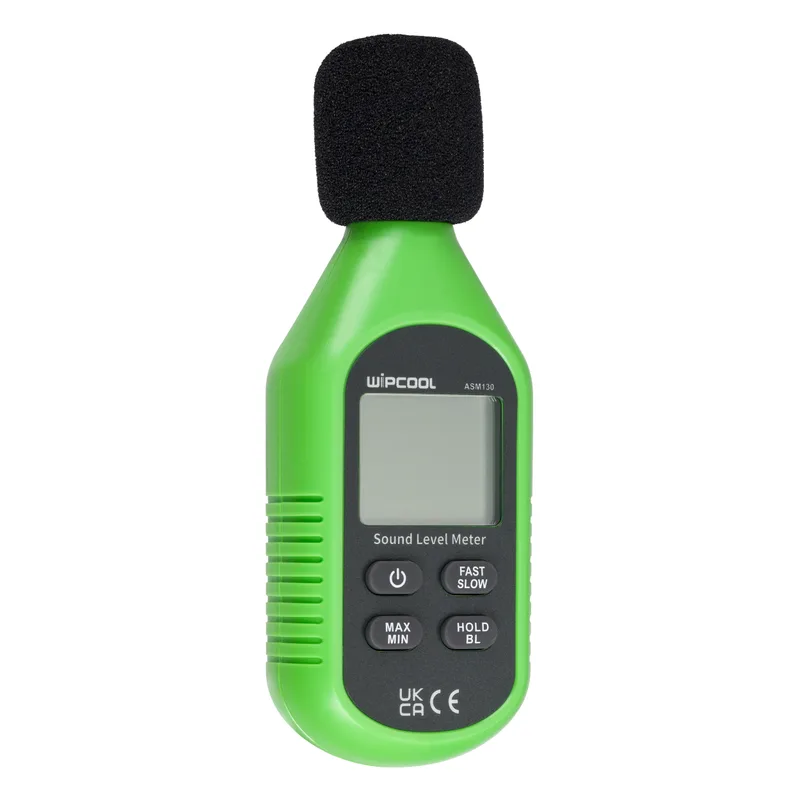
The Wipcool ASM130 Sound Level Meter is used to measure sound levels indoors, including in manufacturing facilities and when assessing home audio systems. It is used in quality control and health protection, as well as to measure traffic noise reaching indoor spaces.
The user manual is an integral part of the product. Please read this manual carefully and follow all instructions closely.
General information
Wipcool products are designed for professional use by qualified air conditioning and refrigeration engineers. As the manufacturer, Wipcool specifies that our devices should only be operated by people with the appropriate qualifications and training.
- ■Observe all local safety regulations and general safety standards when using the Wipcool ASM130 Sound Level Meter.
- ■Keep the user manual near the device so that personnel can access it easily at all times.
- ■Before use, qualified personnel should read the user manual carefully and understand all the instructions it contains.
- ■The manufacturer accepts no liability for any damage resulting from improper use, failure to follow the user manual, lack of personnel qualifications or any unauthorised modifications to the device.
- ■The general terms of sale contained in the sales documents apply.
Symbols and conventions
Symbols and markings used on the device and in the manual:
- 01
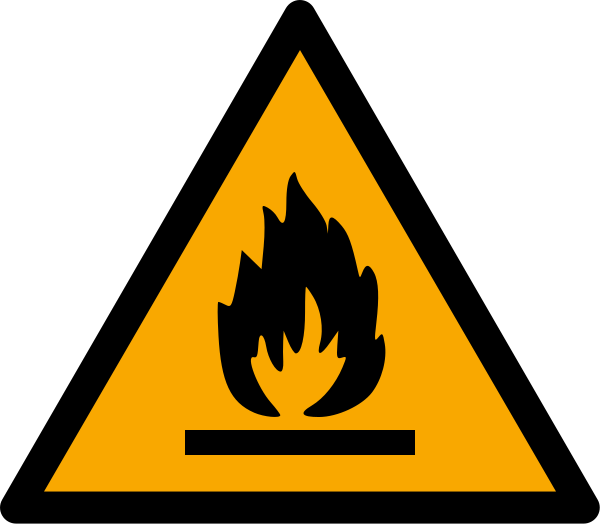 Warning: hazard associated with flammable materials.
- 02
 Notice - risk of damage to the device or incorrect results.
- 03
 Indicates that the product meets the health, safety and environmental standards applicable in the European Union.
- 04
 Do not dispose of the meter with household waste.
Safety information
- ■Before use, check the meter and accessories for damage or abnormalities. If the housing is damaged, the LCD does not work or you suspect that the meter is not working correctly, stop using it.
- ■Do not use or store the meter in places with high temperatures, high humidity or strong electromagnetic interference.
Technical specifications
Sound level measurement
General specifications
Operating conditions
| Temperature | Relative humidity |
|---|---|
| Operation: 0–40 °C | ≤80% RH |
| Operation: 40–50 °C | ≤45% RH |
Device diagram
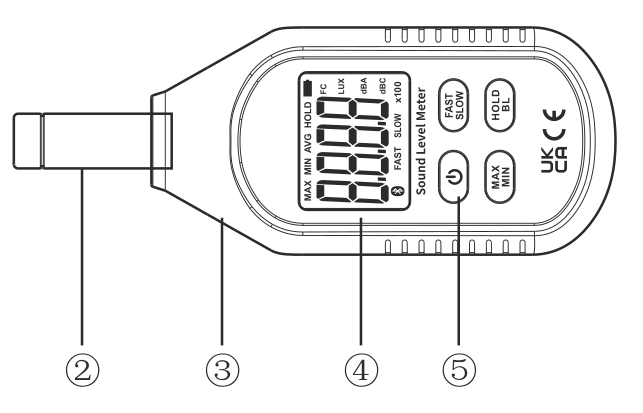
| No. | Name |
|---|---|
| 2 | Condenser microphone |
| 3 | Meter housing |
| 4 | LCD display |
| 5 | Function buttons |
Display
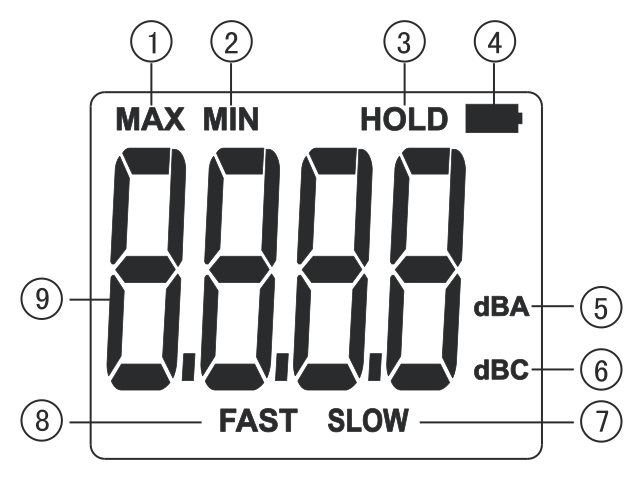
| No. | Meaning |
|---|---|
| 1 | MAX - maximum value |
| 2 | MIN - minimum value |
| 3 | HOLD - reading hold |
| 4 | Low battery indicator |
| 5 | dBA - A-weighting |
| 6 | dBC - C-weighting |
| 7 | SLOW - slow response |
| 8 | FAST - fast response |
| 9 | Measured value |
Buttons
| Button | Function |
|---|---|
| ON/OFF | Power on/off |
| FAST/SLOW | Response time selection |
| MAX/MIN | Maximum and minimum values |
| HOLD/BL | Reading hold (HOLD) and backlight (BL) |
Package contents
After unpacking, check that the package is complete and in good condition. Report any missing or damaged items to the seller.
| Item | Quantity |
|---|---|
| ASM130 meter | 1 pc |
| Foam windscreen | 1 pc |
| User manual | 1 pc |
Storage
- ■Store the meter in a dry place, away from direct sunlight and heat sources, at a temperature of -20 to +60 °C and a relative humidity of up to 80% RH.
- ■Remove the batteries if the meter will not be used for an extended period.
Instructions for use
Before first use, insert the batteries as described under ‘Battery replacement’ in the MAINTENANCE section.
Switching on and off - ON/OFF
Briefly press the ON/OFF button to switch on the meter.
Response time - FAST/SLOW
During measurement, press the FAST/SLOW button to select a fast response in FAST mode or a slow response in SLOW mode. Read the result on the LCD display.
Maximum and minimum values - MAX/MIN
Press the MAX/MIN button repeatedly to cycle between the maximum, minimum and current values. In MAX mode, the meter continuously displays the maximum value; in MIN mode, it displays the minimum value.
Reading hold and backlight - HOLD/BL
Briefly press the HOLD/BL button to hold the reading on the display. Briefly press it again to resume measurement.
Press and hold the HOLD/BL button to switch on the backlight (BL). Press and hold it again to switch it off.
Automatic power-off
To disable automatic power-off, press and hold the HOLD/BL button, then press the ON/OFF button. APO OFF on the display confirms that the function is disabled. The same button combination enables the function again.
Out-of-range indications
- ■UN - sound level below the measurement range.
- ■OL - sound level above the measurement range.
Finishing measurement
After measurement, briefly press the ON/OFF button to switch off the meter.
Maintenance
Repairs
Have repairs carried out by the service centre - submit a request at wipcool.pl/serwis.
Cleaning
Clean the housing with a soft, damp cloth and mild detergent. Do not use abrasives or solvents. Periodically wipe the housing with a dry cloth.
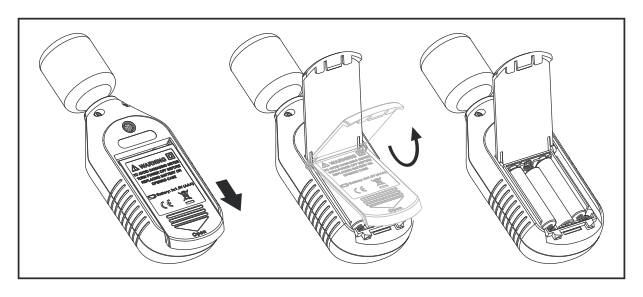
Battery replacement
When the low battery indicator appears on the LCD display, replace the batteries.
Use three AAA 1.5 V batteries of the same type. An incorrect battery type may damage the meter.
- 01Switch off the meter and turn it over.
- 02Slide the battery compartment cover in the direction indicated by the arrow, then lift it.
- 03Remove the spent batteries and insert new ones according to the polarity markings.
- 04Close the battery compartment cover.
Waste electrical and electronic equipment
- 01The crossed-out bin symbol means that the end-of-life device must not be disposed of with other waste.
Under the applicable regulations on waste electrical and electronic equipment, products marked with the separate collection symbol must not be placed with other municipal waste. Because they contain harmful substances, electronic products that are not separately sorted may pose a risk to the environment and human health. Proper separate collection of waste electrical and electronic equipment prevents adverse effects on the environment.
By taking end-of-life equipment to a collection point, the user contributes to its reuse, recycling and recovery.
Recycling - one method of protecting the environment. The process of recovering substances from waste that can be reused as raw materials.
Waste recovery - the use of waste that has lost its useful value, such as plastics, paper and cardboard, as secondary raw materials (also commonly used to mean destruction).
Information on the collection system for waste electrical and electronic equipment
- ■Waste electrical and electronic equipment must not be placed with other waste.
- ■The collection of incomplete electrical and electronic equipment and parts from end-of-life equipment is prohibited.
- ■A distributor delivering equipment intended for households to a purchaser must collect household waste equipment free of charge at the place of delivery, provided that the waste equipment is of the same type and performs the same function as the equipment supplied.
- ■The user may hand over end-of-life equipment to a waste equipment collector, a treatment facility or a municipal waste collector in the municipality.
- ■Information about collection points is available on the BIP websites of the regional marshal offices and city and municipal offices.
Service and documents
Before submitting a request, prepare:
- ■Model - found on the device nameplate and on the invoice.
- ■Serial number - if there is none, provide the production number (e.g. 11/2025), usually found on the underside of the device.
- ■Proof of purchase - an invoice or receipt from an authorised distributor.
- ■Description of the fault - what is happening, when it started and under what conditions.
You can submit a service request at wipcool.pl/serwis. You will also find the warranty terms there.
Warranty period: 1 year.