
 Distribution PL · 4REF
Wipcool CDS24 user manual
Read the entire manual before first use. Keep it for as long as you use the device.
Wipcool CDS24 user manual
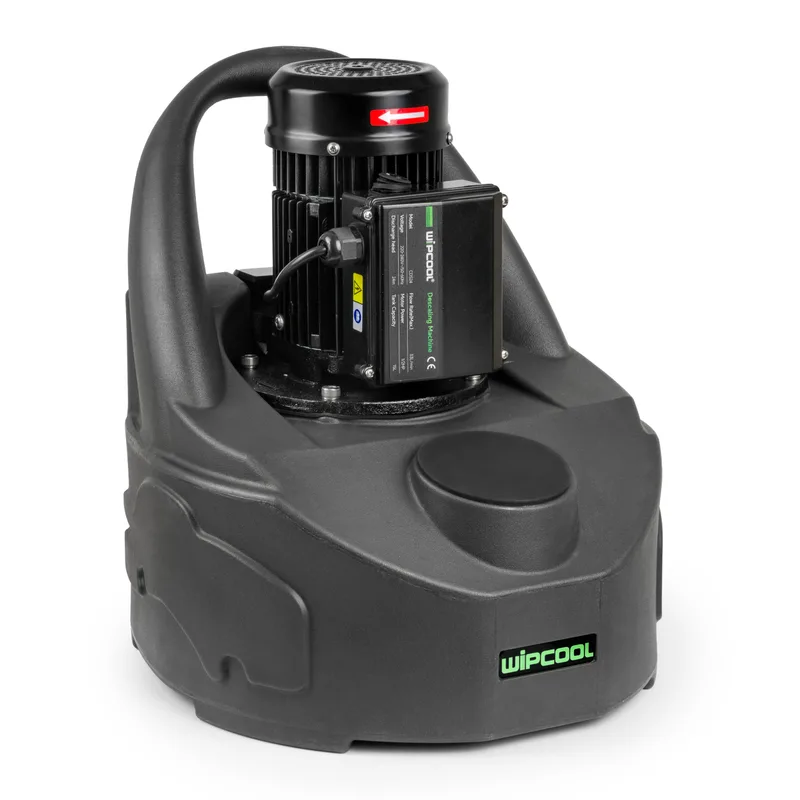
The Wipcool CDS24 pump is designed to clean and descale closed systems, including central heating systems and heat exchangers in HVAC systems. The integrated tank is used to prepare and circulate the cleaning solution.
The user manual is an integral part of the product. Please read this manual carefully and follow all instructions closely.
General information
Wipcool products are designed for professional use by qualified air conditioning and refrigeration technicians. As the manufacturer, Wipcool specifies that our equipment should only be operated by appropriately qualified and trained persons.
- ■Follow all local safety regulations and general safety standards when using the Wipcool CDS24 descaling pump for heat exchangers and central heating systems.
- ■The user manual should be kept near the device so that personnel can access it easily at all times.
- ■Before use, qualified personnel should read the user manual carefully and understand all the instructions it contains.
- ■The manufacturer accepts no liability for any damage resulting from improper use, failure to follow the user manual, lack of personnel qualifications or any unauthorised modifications to the device.
- ■The general terms of sale contained in the sales documents apply.
Symbols and conventions
Signs and markings used on the device and in the manual:
- 01
 Warning - read the text in the box next to the symbol.
- 02
 Dangerous voltage - risk of electric shock.
- 03
 Hot surface - wait for it to cool before touching.
- 04
 Warning of fire or explosion in the presence of flammable materials.
- 05
 Notice - risk of damage to the device or an incorrect result.
- 06
 Indicates that the product meets the health, safety and environmental standards applicable in the European Union.
- 07
 Do not dispose of the pump with household waste.
OFF / O means the pump is switched off, and I means it is switched on. MAX indicates the maximum liquid level in the tank.
Safety information
General rules
- ■Do not leave the pump running unattended.
- ■Use original accessories.
- ■Select a product containing an anti-foaming additive that is compatible with the system being cleaned and with the pump. Follow the product instructions and safety data sheet; obtain any missing information from its manufacturer.
- ■Assess the condition of the system before descaling. A system that has been incorrectly designed, installed or maintained may be damaged during cleaning. The pump may not remove all deposits.
- ■Work in a well-lit, clean, level, stable and dry area. Provide space for the pump and operator and ensure adequate ventilation. Avoid contact of chemicals with skin and eyes and do not inhale vapours.
- ■If necessary, set up barriers to restrict access by bystanders. Bystanders may be sprayed with the product or distract the operator.
Technical specifications
Device diagram
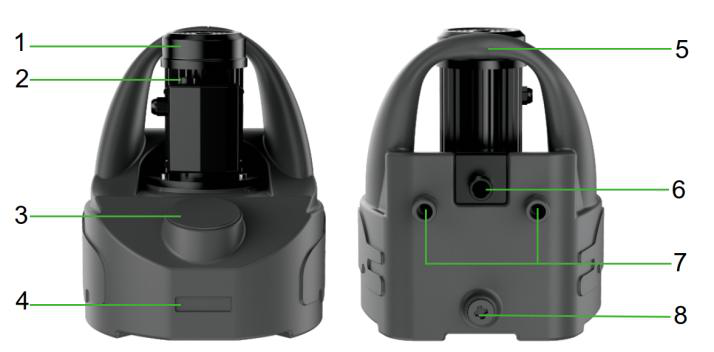
| No. | Name |
|---|---|
| 1 | Motor |
| 2 | Power switch |
| 3 | Tank lid |
| 4 | Tank |
| 5 | Carrying handle |
| 6 | Outlet port |
| 7 | Return port (either of the two) |
| 8 | Drain port |
Package contents
CDS24 pump with user manual (1 pc.) and the following accessories:
- 01
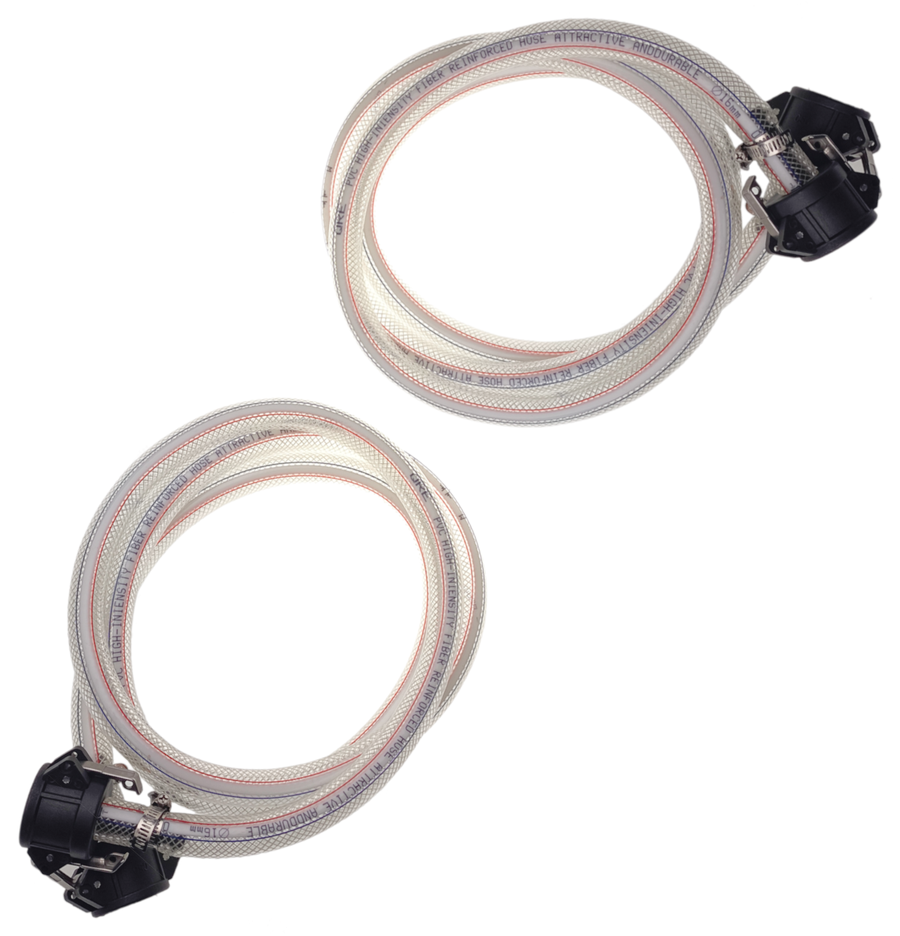 2 m hose2 pcs.
- 02
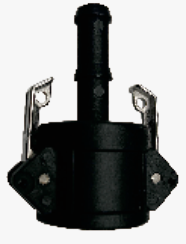 Quick-release coupling4 pcs.
- 03
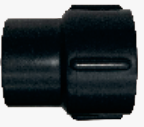 3/4" FFL - 1/2" FFL adapter2 pcs.
- 04
 Hose clamp4 pcs.
- 05
 1/2" MFL quick-release coupling2 pcs.
- 06
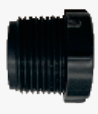 3/4" MFL - 1/2" FFL adapter2 pcs.
After unpacking, check that the set is complete and in good condition. Report any missing items or transport damage to the seller.
Transport and storage
- ■After completing the steps in ‘Finishing work’, coil the capped hoses. Make sure all parts are dry before putting them into storage.
- ■Do not throw the pump during transport. Protect it from shocks, excessive vibration, moisture, dust and extreme temperatures.
- ■Protect the pump from frost. Store it in a dry, well-ventilated room at 5–40 °C, away from direct sunlight and heat sources. If stored outdoors, cover it thoroughly.
- ■Store the pump in a locked location, out of reach of children and untrained persons.
Application
The pump is designed for cleaning, flushing and descaling closed hydraulic and pipework systems, as well as hot water cylinders, boilers and heat exchangers. During servicing and regular maintenance, it can be used to clean wall-mounted boilers, underfloor heating, radiators, heat pumps, water heaters and small water-cooled condensers.
Connection
Pre-use inspection
- ■Disconnect the pump from the power supply and inspect the cable and plug. Do not use the device with a modified plug or a damaged cable.
- ■Clean the pump, particularly the carrying handle and power switch, so that they do not slip in your hands.
- ■Check that all parts are present and correctly assembled, inspect their condition and check that moving parts are not misaligned or jammed. Check the hoses, connections and ports for wear and damage, and the hoses for kinks, cuts and cracks. Make sure the hoses and connections are correctly fitted and clear of obstructions.
- ■Check other equipment in use according to its instructions. Do not start the pump until all faults have been corrected.
Preparing the system
- ■Identify the connection points, drains and other connected systems.
- ■Prepare the system according to its maintenance and operating instructions. Vented systems may require the pipes to be capped or connected in a loop. Protect expansion vessels appropriately.
Extension lead and residual current protection
If the pump cable does not reach the socket, use an extension lead in good condition with a plug that fits the socket and a protective earth conductor. For outdoor work, select an extension lead marked as suitable for those conditions.
| Extension lead length | Minimum conductor cross-sectional area |
|---|---|
| Up to 15 m | 1.5 mm² |
| Over 15 m up to 30 m | 2.5 mm² |
If the socket is not protected by a residual current device (RCD), use a portable RCD between the socket and the extension lead to reduce the risk of electric shock if the cable is damaged.
Connecting the pump
- 01Set the power switch to OFF / O (off) and make sure the plug is disconnected.
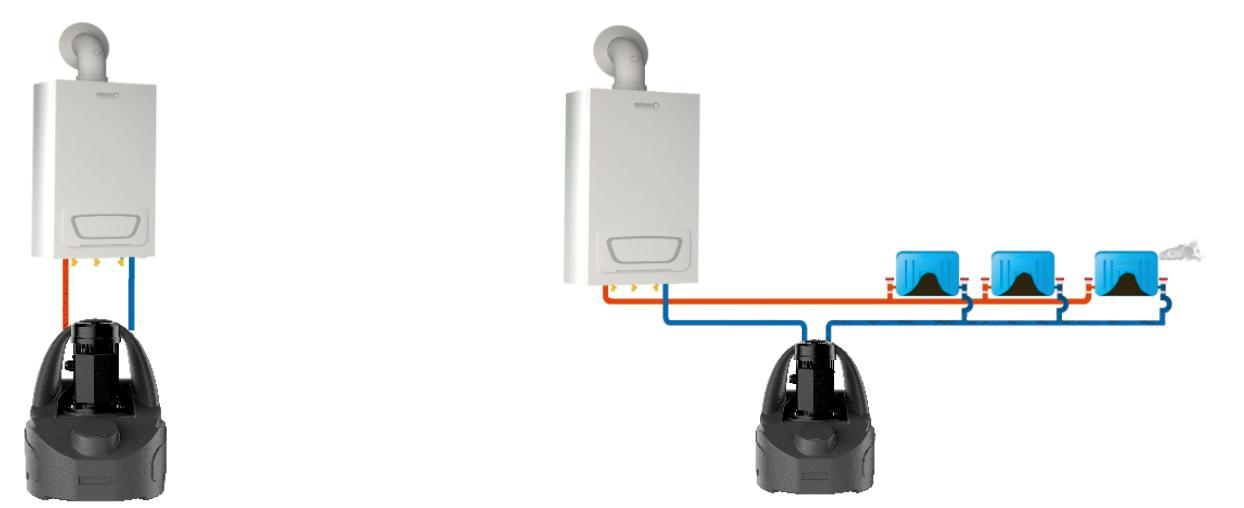
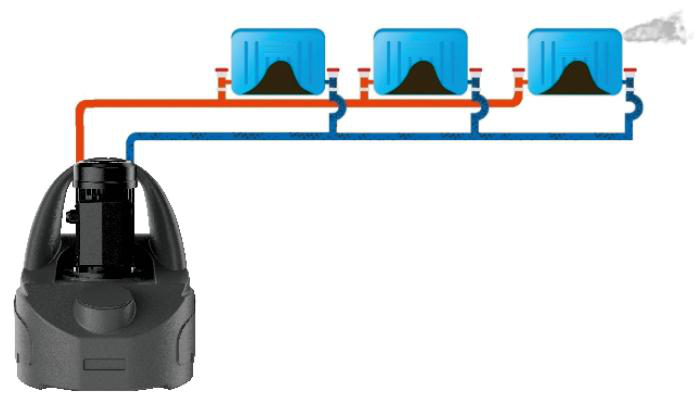
- 02Connect the outlet hose to the pump outlet port and the return hose to one of its return ports. Connect the other ends of the hoses to the inlet and outlet of the prepared system, forming a closed circuit. Use adapters if necessary. Do not overtighten the connections.
- 03Route the power cable where it will not be exposed to damage. With dry hands, connect the plug to an earthed socket. Keep all electrical connections dry and off the ground.
Instructions for use
Clean water test
- 01After connecting the entire circuit, fill the tank with clean water.
- 02Set the power switch to I. Allow air to escape from the system and the water flow to stabilise.
- 03Check the hoses and connections for leaks. If you find a leak, set the power switch to OFF / O and disconnect the plug before repairing the leak. Repeat the test after repair.
- 04After a successful test, switch off the pump and disconnect it from the power supply, then drain the water from the system and tank.
Descaling
- 01Fill the tank with descaling solution prepared according to the product instructions.
- 02With dry hands, connect the plug and set the power switch to I to start circulating the solution.
- 03If the solution foams excessively, switch off the pump and wait for the foam to subside. If foaming persists, it may be necessary to dilute the solution with water.
- 04Determine when descaling is complete according to the product instructions. The process is usually complete when the circulating solution no longer produces foam or loses colour.
Finishing work
Drain, flush and handle the used solution according to the product instructions and applicable regulations.
- 01Set the power switch to OFF / O and carefully drain the solution from the system.
- 02Disconnect the pump from the power supply. Empty the tank and disconnect the hoses from the system.
- 03Flush the pump, tank and hoses with clean water to remove any product residue. Drain them and cap the hoses.
- 04Perform the final flush of the system according to the product instructions and the system user manual. Depending on the level of contamination, repeat the flush, then return the system to service.
Circuit examples
Maintenance
- ■Wipe the housing with a soft, damp cloth. Do not use alcohol, petrol, solvents, corrosive substances, abrasives or strong detergents.
- ■Keep contaminants out of the pump. Check the condition of the hoses, connections and ports.
- ■After maintenance, check the condition of the pump, accessories and power cable, and perform an operational test as described in ‘Clean water test’.
Troubleshooting
Switch off the pump and disconnect it from the power supply before inspection or maintenance.
| Problem | Possible cause | Solution |
|---|---|---|
| Device does not start | No power supply | Check that the plug is connected and that the socket has power. |
| Device does not start | Incorrect voltage | Check that the input voltage is within ±5% of the rated voltage. |
| Device does not start | Device overloaded | Check that the system valves are open and the hoses are not kinked. |
| Device does not start | Damaged power cable | Have the device repaired by the service centre - submit a service request at wipcool.pl/serwis. |
| Device does not start | Ambient temperature too low | Switch off the pump. Resume operation only in a location with a temperature of 5–40 °C. |
| No flow after starting | Insufficient water in the tank | Top up the water. |
| No flow after starting | System valve closed | Check the system and open the valve. |
| No flow after starting | Blocked water inlet | Check the hoses and connections for blockages; flush them with clean water. If flow is not restored, have the device repaired by the service centre - submit a service request at wipcool.pl/serwis. |
| No flow after starting | Air in the system | Bleed the system during the clean water test described in ‘Instructions for use’. |
| No flow after starting | Ambient temperature too low | Switch off the pump. Resume operation only in a location with a temperature of 5–40 °C. |
| Liquid leak | Loose connection | Tighten the connection. |
| Liquid leak | Leak from the pump | Have the device repaired by the service centre - submit a service request at wipcool.pl/serwis. |
| Liquid leak | Damaged seal | Have the device repaired by the service centre - submit a service request at wipcool.pl/serwis. |
| Noisy operation | Foreign object in the pump | Flush the pump, tank and hoses with clean water as described in ‘Finishing work’. If the noise persists, have the device repaired by the service centre - submit a service request at wipcool.pl/serwis. |
| Noisy operation | Worn internal components | Have the device repaired by the service centre - submit a service request at wipcool.pl/serwis. |
| Noisy operation | Motor overloaded | Stop the pump. Check that the system valves are open and the hoses are not kinked. |
| Noisy operation | Air being drawn in | Check the system for leaks and check the liquid level. |
| Noisy operation | Damaged internal components | Have the device repaired by the service centre - submit a service request at wipcool.pl/serwis. |
| Low performance | Contamination in the system | Clean the pipes and tank. |
| Low performance | Kinked or damaged hose | Check and reposition the hoses; replace any damaged hose. |
| Low performance | Worn pump components | Have the device repaired by the service centre - submit a service request at wipcool.pl/serwis. |
| Device switches off during operation | Overheating | Disconnect the device from the power supply and allow it to cool. |
| Device switches off during operation | Continuous operating time too long | Observe the operating time and rest period specified in ‘Descaling’. |
Waste electrical and electronic equipment
- 01The crossed-out bin symbol means that the used device must not be disposed of with other waste.
Under applicable regulations on waste electrical and electronic equipment, products marked with the separate collection symbol must not be disposed of with other municipal waste. Because they contain harmful substances, electronic products that are not separately sorted may pose a risk to the environment and human health. Proper separate collection of waste electrical and electronic equipment prevents adverse effects on the environment.
By taking used equipment to a collection point, the user contributes to its reuse, recycling and recovery.
Recycling - one method of protecting the environment. The process of recovering substances from waste that can be reused as raw materials.
Waste recovery - the use (also commonly understood as destruction) of waste that has lost its use value, such as plastics, paper and cardboard, as secondary raw materials.
Information on the collection system for waste electrical and electronic equipment
- ■Waste electrical and electronic equipment must not be disposed of with other waste.
- ■The collection of incomplete electrical and electronic equipment and parts from waste equipment is prohibited.
- ■A distributor delivering equipment intended for households to a buyer must collect waste household equipment free of charge at the place of delivery, provided that the waste equipment is of the same type and performs the same function as the equipment delivered.
- ■The user can hand over waste equipment to a waste equipment collector, a treatment facility or a municipal waste collector in the municipality.
- ■Information on collection points is available on the Public Information Bulletin (BIP) websites of regional, city and municipal authorities.
Service and documents
Before submitting a service request, prepare:
- ■Model - shown on the device nameplate and on the invoice.
- ■Serial number - if there is none, provide the production number (e.g. 11/2025), usually found on the bottom of the device.
- ■Proof of purchase - an invoice or receipt from an authorised distributor.
- ■Description of the fault - what is happening, when it started and under what conditions.
You can submit a service request at wipcool.pl/serwis. You will also find the warranty terms there.