
 Distribution PL · 4REF
Wipcool ALM40 user manual
Read the entire manual before first use. Keep it for as long as you use the device.
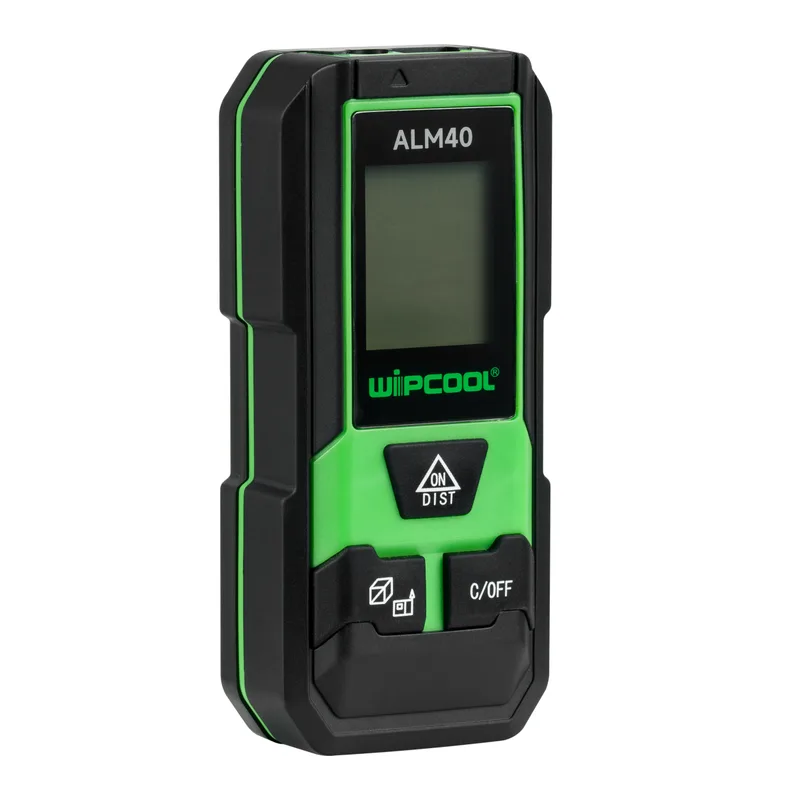
Wipcool ALM40 user manual
The Wipcool ALM40 Laser Distance Meter is used to measure distances during construction and renovation work. It can also calculate area, volume and length using the Pythagorean theorem.
The user manual is an integral part of the product. Please read this manual carefully and follow all instructions closely.
General information
Wipcool products are designed for professional use by qualified air conditioning and refrigeration engineers. As the manufacturer, Wipcool stipulates that our devices should only be operated by people with the appropriate qualifications and training.
- ■Comply with all local safety regulations and general safety standards when using the Wipcool ALM40 Laser Distance Meter.
- ■The user manual should be kept near the device so that personnel can access it easily at any time.
- ■Before use, qualified personnel should read the user manual carefully and understand all instructions it contains.
- ■The manufacturer accepts no liability for any damage resulting from improper use, failure to follow the user manual, lack of personnel qualifications or any unauthorised modifications to the device.
- ■The general terms of sale set out in the sales documents apply.
Symbols and conventions
Signs and markings used on the device and in the manual:
- 01
 Laser radiation. Do not point the beam at eyes or highly reflective surfaces. Class 2 laser product.
- 02
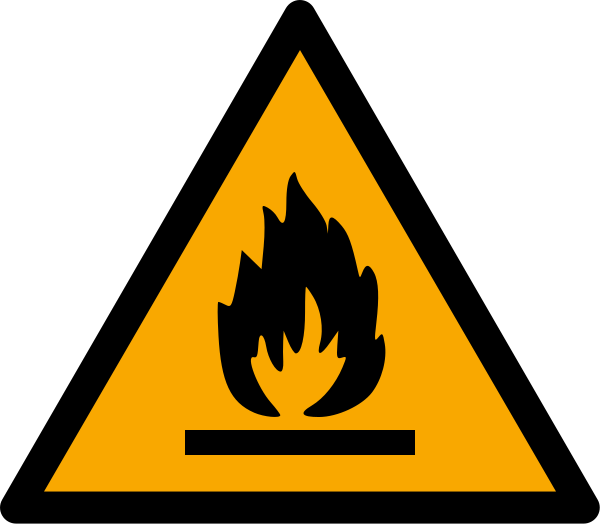 Flammable materials. Do not use the distance meter in a flammable or explosive environment.
- 03
 Notice - risk of damage to the device or an incorrect result.
- 04
 Tip - practical information to help with measurement.
- 05
 Indicates that the product meets the health, safety and environmental standards applicable in the European Union.
- 06
 Do not dispose of the device with household waste.
Safety information
- ■Do not open or repair the device yourself. Do not modify the laser or change its settings.
- ■Keep the distance meter out of the reach of children. Do not allow unauthorised persons to operate it.
- ■If the distance meter is damaged, stop using it.
- ■Do not use the distance meter near medical equipment or on board an aircraft. Electromagnetic radiation may interfere with devices such as pacemakers or hearing aids.
Technical specifications
* The accuracy of ±5 mm applies to measurements at room temperature with a surface that reflects the signal well. Accuracy also depends on distance. Strong ambient light, excessively strong or weak diffuse reflection and a large temperature difference reduce accuracy. In difficult conditions, the error may reach ±0.25 mm/m.
Device diagram
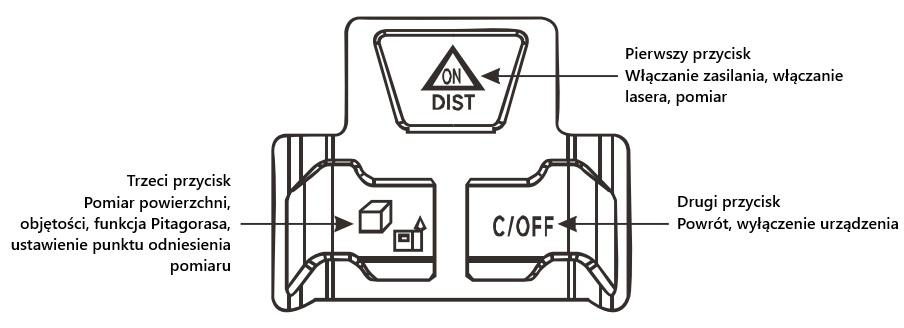
Buttons
| Button | Function |
|---|---|
| First: ON/DIST | Switches on the distance meter, switches on the laser or takes a measurement. |
| Second: C/OFF | Goes back and switches off the distance meter. |
| Third: measurement mode and reference point symbols | Selects area, volume or Pythagorean measurement; changes the measurement reference point. |
Display
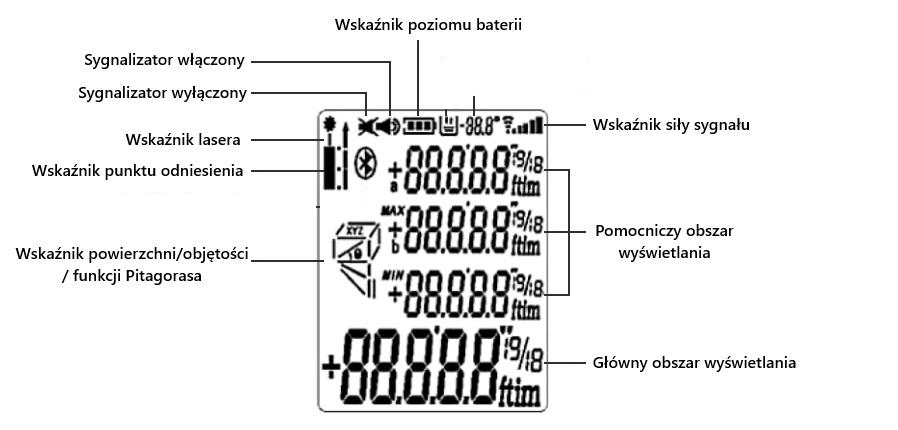
The weaker the signal reflected from the target, the fewer segments of the signal strength indicator light up.
Package contents
After unpacking, check that the package is complete and in good condition. Report any missing or damaged items to the seller.
| Item | Quantity |
|---|---|
| Wipcool ALM40 Laser Distance Meter | 1 pc |
| User manual | 1 pc |
Transport and storage
- ■Transport the distance meter in its original packaging.
- ■Store the distance meter in a dry place, away from direct sunlight and heat sources, at a temperature of -20 to +60 °C.
- ■Remove the batteries if the device will not be used for an extended period.
How to use
Before first use, insert the batteries as described in ‘Replacing the batteries’ (MAINTENANCE section).
Switching on
With the distance meter switched off, hold the first button, ON/DIST, for approximately 0.5 s to switch it on.
Automatic switch-off
The distance meter switches off automatically after approximately 45 s of inactivity. The laser switches off automatically after 15 s.
Distance measurement
With the distance meter switched on, briefly press ON/DIST to switch on the laser or take a distance measurement. Press and hold this button to start continuous measurement.
Measurement reference point
With the distance meter switched on, hold the third button for approximately 2 s to change the measurement reference point. When restarted, the device restores the default reference point.
Settings
- 01With the distance meter switched off, hold ON/DIST for approximately 5 s to enter the settings.
- 02Hold ON/DIST for approximately 1 s to switch between the parameters to be set: measurement correction within ±7 mm, metric or imperial units, backlight and audible signal.
- 03Briefly press ON/DIST to change the value of the selected parameter.
Area measurement
- 01Briefly press the third button until the rectangle symbol appears on the display. The flashing first side indicates the measurement to be taken.
- 02Aim the laser and measure the first side using ON/DIST. After the reading, the second side of the rectangle will start flashing.
- 03Aim the laser again and measure the second side using ON/DIST. The area result will appear in the main display area and the lengths of both sides in the secondary area.
Volume measurement
- 01Briefly press the third button until the cube symbol appears.
- 02Measure the length, width and height as for area measurement. The device will automatically calculate the volume.
Measurement using the Pythagorean theorem
This measurement allows you to determine the height of an inaccessible point. The device automatically calculates the length from measurements of the sides of a triangle. The distance meter has three measurement modes using the Pythagorean theorem. Briefly press the third button until the symbol for the selected mode appears on the display.


Finishing measurement
To switch off the distance meter, hold the second button, C/OFF, for approximately 1 s.
Maintenance
Have repairs carried out by the service centre - submit a request at wipcool.pl/serwis.
Cleaning
Do not immerse the device in water or use aggressive cleaning agents. Clean the housing with a soft, damp cloth. Clean the laser output window and signal receiver lens with a soft, dry optical cloth.
Replacing the batteries
When the low battery indicator appears, replace the batteries as soon as possible. Use two AAA 1.5 V alkaline batteries.
- 01Switch off the distance meter and open the battery compartment cover. If replacing the batteries, remove the spent batteries.
- 02Insert the batteries according to the polarity markings. Close the battery compartment cover.
Troubleshooting
| Code | Meaning | Solution |
|---|---|---|
| B.L | Battery voltage is too low. | Replace the batteries. |
| T.L | The temperature is too low. | Leave the device indoors until it reaches room temperature. |
| T.H | The temperature is too high. | Cool the device. |
Code D.E indicates a measurement data error: the range has been exceeded or an error has occurred during measurement using the Pythagorean theorem.
Waste electrical and electronic equipment
- 01The crossed-out bin symbol means that the used device must not be disposed of with other waste.
Under the applicable regulations on waste electrical and electronic equipment, products marked with the separate collection symbol must not be placed with other municipal waste. Because they contain harmful substances, electronic products that are not sorted separately may be hazardous to the environment and human health. Proper separate collection of waste electrical and electronic equipment prevents adverse effects on the environment.
By taking used equipment to a collection point, the user contributes to its reuse, recycling and recovery.
Recycling - a method of protecting the environment. The process of recovering substances from waste that can be reused as raw materials.
Waste recovery - the use of waste that has lost its useful value as secondary raw materials, for example plastics, paper and cardboard; the term is also commonly used to mean destruction of waste.
Information about the waste electrical and electronic equipment collection system
- ■Waste electrical and electronic equipment must not be placed with other waste.
- ■Collection of incomplete electrical and electronic equipment and parts from waste equipment is prohibited.
- ■A distributor delivering equipment intended for households to a purchaser must collect waste household equipment free of charge at the place of delivery, provided that the waste equipment is of the same type and performs the same function as the equipment supplied.
- ■The user may hand over waste equipment to a waste equipment collector, a treatment facility or a municipal waste collector in the municipality.
- ■Information on collection points is available on the Public Information Bulletin (BIP) websites of regional, city and municipal authorities.
Service and documents
Before submitting a request, prepare:
- ■Model - shown on the device nameplate and on the invoice.
- ■Serial number - if there is none, provide the production number (e.g. 11/2025), usually found on the underside of the device.
- ■Proof of purchase - an invoice or receipt from an authorised distributor.
- ■Description of the fault - what is happening, since when and under what conditions.
You can submit a service request at wipcool.pl/serwis. You will also find the warranty terms there.
Warranty period: 1 year.